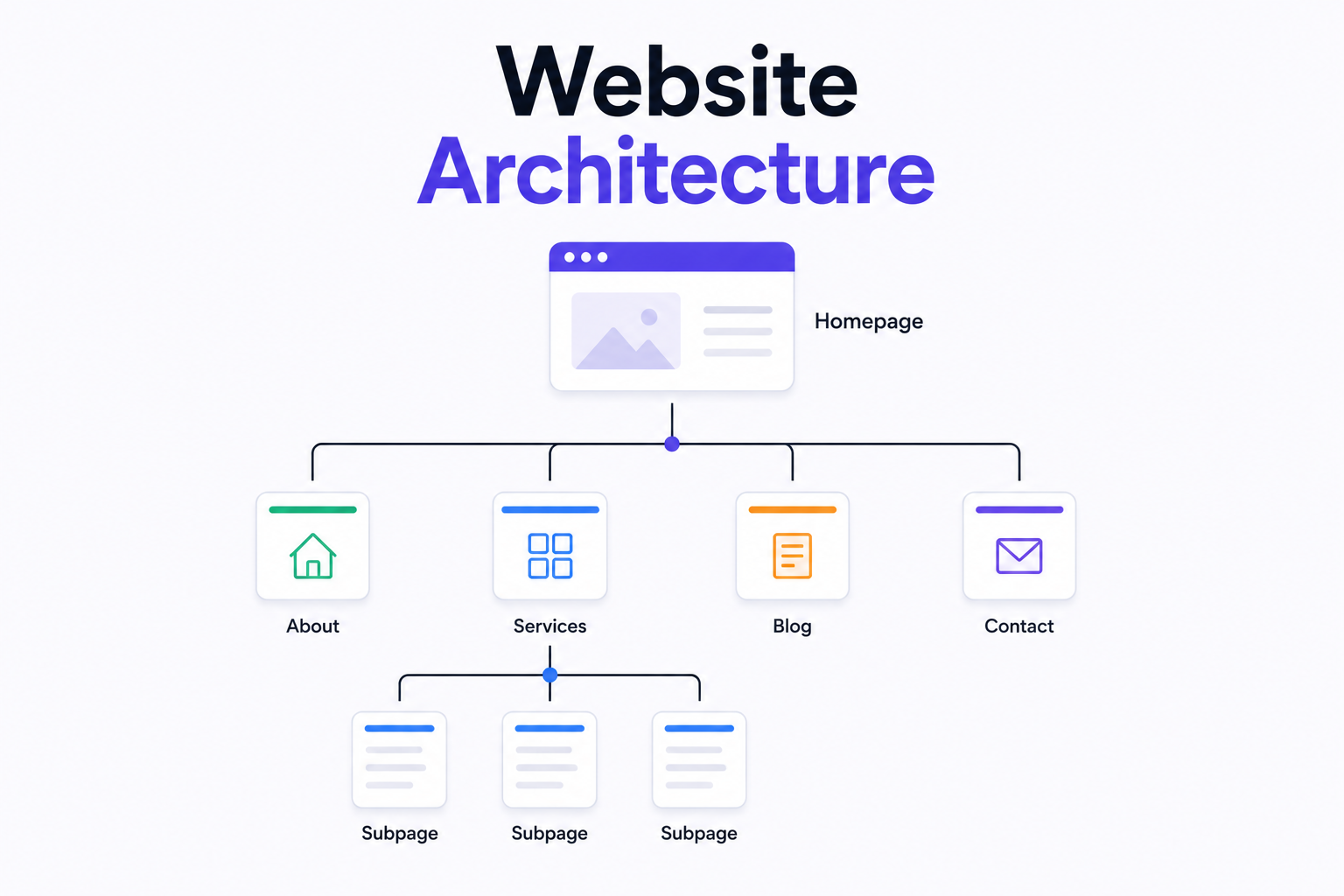
What Is Website Architecture?
Website architecture refers to the way a website is structured, organized, and connected internally. It defines how pages relate to each other, how users move from one section to another, and how search engines crawl and index content across the entire site. A well planned website architecture makes it easier for both visitors and search engines to find what they are looking for, which directly impacts usability, engagement, and search rankings.
Most people think of website design as a purely visual discipline, but architecture is a separate and equally important layer that exists beneath the visuals. Two websites can look identical on the surface yet have completely different underlying structures. The one with better architecture will almost always outperform the other in search rankings and user retention, because Google rewards sites that are logically organized, easy to navigate, and built around clear topical relationships.
Whether you are planning a brand new website or reviewing an existing one, understanding website architecture gives you the foundation to make smarter decisions about how your digital presence is built, structured, and grown over time.
What Is Information Architecture for a Website?
Information architecture is a specific discipline within website architecture that focuses on how content is organized, labeled, and presented to users. While overall website architecture deals with the technical structure of a site, information architecture is concerned with the user experience side of that structure. It answers questions like: where does this page belong in the site hierarchy, what should navigation labels say, and how should content categories be grouped to match how users actually think about them.
Good information architecture improves website usability by reducing the mental effort required to find something. When users land on a page and immediately understand where they are and how to get where they want to go, they stay longer, engage more deeply, and are more likely to take action. Poor information architecture produces confusion and high bounce rates regardless of how attractive the visual design is.
Designing information architecture well requires a genuine understanding of your audience. The categories and labels that feel obvious to the people who built the site are not always obvious to the people who use it. User research, card sorting exercises, and usability testing are all methods used to validate that the information architecture reflects how real users think rather than how internal teams think.
Content Architecture: Organizing Content Types and Taxonomies
Information architecture, covered above, deals with how pages are organized and labeled for users. Content architecture is a related but distinct layer underneath it: the structural model for the different types of content a site contains, and the taxonomy that connects them. Where IA answers "where does this page live in the navigation," content architecture answers "what kind of content is this, and what other content is it related to."
A content type is a structural category with its own fields and template — a blog post, a case study, a product, a team member profile. Each content type typically needs its own fields (a case study needs a client name and result metric; a blog post needs an author and publish date) and its own display template. Defining content types clearly before building a site prevents the common problem of every page being built as a one-off, which makes a site increasingly difficult to maintain and inconsistent to navigate as it grows.
Taxonomy is the classification system that connects content across those types — categories, tags, industries, or topics that let a visitor (or a search engine) understand how a blog post relates to a service page, or how multiple case studies relate to a single industry vertical. A well-built taxonomy is what allows a "topic cluster" internal linking model, referenced in the silo architecture section above, to actually function: the taxonomy is the data structure, and the silo is the linking pattern built on top of it.
This distinction matters most for two situations: sites with a genuinely large content library (dozens of blog posts, case studies, and service pages that all need to interconnect), and any site using a headless CMS, where content architecture has to be defined explicitly since there's no visual page builder implicitly enforcing structure. A CMS like Contentful, Sanity, or Strapi requires content types and taxonomies to be modeled deliberately before a single piece of content is created — which is a more demanding version of the same sitemap-first discipline this guide recommends for page architecture generally.
Why Website Architecture Matters for SEO
Search engine optimization and website architecture are deeply connected. When Google sends its crawlers to index your site, they follow links from page to page to discover and understand your content. A site with poor architecture creates dead ends, orphaned pages, and confusing hierarchies that make it harder for crawlers to do their job. The result is that pages which deserve to rank either get missed entirely or are not given the authority they should have.
The top SEO considerations for website architecture come down to a few core principles. Every important page should be reachable within three clicks from the homepage. URLs should be clean, descriptive, and logically structured to reflect the site hierarchy. Internal links should connect related pages in a way that distributes authority across the site rather than concentrating it on just a handful of pages. And the overall hierarchy should reflect how topics and subtopics relate to each other in a meaningful and consistent way.
When a website is architecturally sound, Google can understand not just individual pages but the relationships between them. This is what builds topical authority, which is one of the most significant factors determining how well a site ranks for competitive keywords over time. Optimizing your website architecture for SEO is not a one-time task but an ongoing process that pays compounding dividends as the site grows.
The Main Types of Website Architecture
There are several structural models used to organize websites, and the right choice depends on the size, purpose, and content strategy of the site. Understanding the differences helps you make a more informed decision when planning a new project or restructuring an existing one.
A hierarchical architecture is the most common model. It organizes pages in a tree-like structure with the homepage at the top, main category pages beneath it, and individual content pages nested within each category. This model works well for most business websites, blogs, and ecommerce stores because it mirrors how people naturally expect information to be organized. Ecommerce website architecture almost always follows this model, with product categories sitting between the homepage and individual product pages.
A flat website architecture places every page within a very small number of clicks from the homepage, typically one or two levels deep. Flat architectures are beneficial for SEO because link authority from the homepage flows directly to important pages without being diluted through multiple layers of hierarchy. Smaller sites with focused content topics benefit most from this approach, and it is particularly effective for building best website architecture on lean, purpose-built sites.
A sequential architecture guides users through a predefined path from one page to the next. This model is used in checkout flows, onboarding sequences, and multi-step forms where the order of information matters significantly. It is not typically used for the main structure of a website but for specific user journeys within it.
A database-driven architecture organizes content dynamically based on categories, tags, filters, and user behavior rather than a fixed page hierarchy. Large ecommerce platforms and content-heavy sites use this model because it allows thousands or millions of pages to be organized and surfaced efficiently without manually managing each one. Architecture for ecommerce websites at scale almost always incorporates this dynamic approach alongside a broader hierarchical structure.
What Is Website Silo Architecture?
Website silo architecture is an SEO-focused structural approach where content is grouped into tightly themed clusters, with each cluster covering a specific topic in depth. Within each silo, pages link to each other and to a central pillar page for that topic. Cross-linking between silos is kept intentionally limited so that each cluster sends a concentrated topical signal to search engines.
For example, a web development agency might build one silo covering all topics related to frontend development, another covering backend development, and another covering UI/UX design. Each silo has a main pillar page supported by multiple related content pages that all link back to it. This concentrated internal linking structure builds topical authority efficiently and is one of the most effective long-term SEO strategies for content-driven websites.
Website silo architecture requires careful planning before content creation begins. Retrofitting a silo structure onto an existing site that was not built with one is possible but significantly more work than planning it correctly from the start. This is one of the strongest arguments for investing in proper website architecture planning before a single page is published.
What Is Website Application Architecture?
Website application architecture refers to the technical structure of how a web application is built at the system level. This goes beyond the page hierarchy and content organization discussed above and deals with how the different technical components of a web application communicate with each other. It covers the relationship between the frontend interface, the backend server, the database, external APIs, and any third-party services the application depends on.
A common model is the three-tier architecture, which separates a web application into three distinct layers. The presentation layer is what users see and interact with in the browser. The application layer contains the business logic and processes requests from the frontend. The data layer manages storage and retrieval through the database. Each layer operates independently, which makes the system easier to maintain, scale, and debug.
Firms that build websites with headless CMS architecture take a different approach. In a headless setup, the content management system is decoupled from the frontend presentation layer. Content is stored and managed in the CMS but delivered to any frontend via an API, giving development teams complete freedom over how content is displayed without being constrained by the CMS templates. This model is increasingly popular for high-performance sites that need to deliver content across multiple platforms simultaneously.
How to Create a Website Architecture
Creating a website architecture starts with a thorough content plan. You need a clear picture of every page the site will contain before you can decide how to organize them. List every page, group related pages into logical categories, and define the hierarchy that connects everything from the homepage down to individual content pages.
The next step is to produce a sitemap. A sitemap is a visual diagram or structured document that maps out every page and shows how they connect to each other. It acts as the blueprint that guides both the development and content teams throughout the entire build. A well structured sitemap prevents the kind of ad-hoc page creation that produces disorganized sites over time and makes architecture planning visible to all stakeholders before any development begins.
URL structure should be defined alongside the sitemap. URLs should be short, descriptive, and reflect the hierarchy of the site naturally. A URL like munixstudio.com/services/web-development is clean, readable, and tells both users and search engines exactly where they are within the site. Avoid auto-generated URLs with random strings, parameters, or numbers that provide no meaningful structural information.
Website architecture planning also includes defining the internal linking strategy before content goes live. Every important page should receive internal links from other relevant pages. Orphaned pages with no internal links pointing to them are essentially invisible to search engines regardless of how well written their content is. A deliberate linking plan ensures authority flows throughout the site in a structured and intentional way.
How to Design a Website Architecture

Designing a website architecture involves both strategic thinking and practical documentation. The process begins with understanding the goals of the site, the audience it serves, and the content it will contain. From there, the designer or information architect creates a sitemap that reflects the logical grouping of topics and the navigational paths users will take to move through the site.
An architecture diagram for the website is often created at this stage. This diagram visually represents the pages, their hierarchy, and the links between them in a format that is easy for the entire project team to review and validate before development begins. Tools like Figma, Whimsical, and Miro are commonly used to produce these diagrams.
Navigation design is a critical part of how you show the architectural design of a website to users. The main navigation menu should reflect the top level of the hierarchy and give users an immediate overview of what the site contains. Secondary navigation, breadcrumbs, and footer links all contribute to making the architecture visible and accessible to every visitor regardless of which page they land on first.
How to Optimize Website Architecture for SEO
Optimizing your website architecture for SEO is an ongoing process that becomes more important as the site grows. Several specific practices make a consistent and significant difference to how well a site performs in search over time.
Keep the hierarchy shallow. Pages buried four or five levels deep receive very little link authority and are crawled less frequently. If a page matters to your business, it should sit closer to the top of the hierarchy where it receives more attention from both users and search engines.
Use breadcrumbs on every page. Breadcrumbs show users where they are within the site and provide additional internal links that reinforce structural relationships between pages. Google also displays breadcrumb paths in search results, which can improve click through rates by giving searchers more context about a page before they visit it.
Submit an XML sitemap to Google Search Console. An XML sitemap lists every page on your site and helps Google discover and index them efficiently. On larger sites or newly launched ones, submitting a sitemap ensures no important pages are missed during the crawl process.
Audit internal links regularly. Over time, pages get deleted, URLs change, and new content is added without proper linking in place. Regular audits using tools like Screaming Frog or Ahrefs identify broken links, orphaned pages, and missed internal linking opportunities that are quietly costing you ranking potential every month.
Website Architecture Best Practices: A Complete Checklist
Everything covered in this guide feeds into a set of practices worth returning to as a working checklist, spanning structure, SEO, and user experience together rather than any one of them in isolation.
Structure and hierarchy
Keep every important page within three clicks of the homepage
Choose a hierarchical model for most business sites, flat for small, focused sites, and database-driven only once content volume genuinely requires it
Plan the full sitemap before any page is built, not after
URLs and navigation
Use short, descriptive, human-readable URLs that mirror the site hierarchy
Avoid auto-generated URLs with parameters or random strings
Add breadcrumbs to every page, both for users and for the rich snippet benefit in search results
Make sure primary navigation reflects the top level of the hierarchy exactly — it's the clearest architecture signal a visitor sees
Internal linking
Every page should receive at least one internal link from a relevant page — orphaned pages are effectively invisible to search engines
Use topic clusters or silo linking for content-heavy sections to concentrate topical authority
Audit internal links on a regular schedule, not just at launch, since links break silently as content is added or removed
Content and taxonomy
Define content types and taxonomy before content production begins, not retroactively
Group related content so users and crawlers can both see the relationship between a service page and its supporting content
Technical foundations
Submit an XML sitemap to Google Search Console and keep it current
Choose application architecture (three-tier, headless, or traditional) based on actual content-delivery needs, not trend-following
Revisit the architecture when bounce rates rise, important pages underperform despite strong content, or orphaned pages start accumulating — the warning signs already covered in this guide's FAQ
Build Your Website on a Solid Architecture From Day One
Website architecture is not something that should be fixed after a site is already live. It needs to be planned before a single page is created. At Munix Studio, every project begins with a thorough planning phase where we define the full site structure, URL hierarchy, internal linking strategy, and information architecture before development starts. This ensures your website is built on a foundation that supports growth, ranks well in search, and delivers a clear and intuitive experience to every visitor.
Website Development Services — Custom websites built with clean architecture, optimized URL structure, and a scalable codebase from day one.
UI/UX Design Services — Information architecture and user experience design that makes navigation intuitive and drives conversions naturally.
App Development Services — Scalable web and mobile applications built on solid architectural foundations designed for long-term growth.
Maintenance and Support — Regular structural audits and improvements to keep your site clean, fast, and fully optimized over time.
Frequently Asked Questions
Ready to Get Started?
Website Development
We build custom websites on React and Next.js with clean URL structures, shallow page hierarchies, and internal linking built in from day one. Your site architecture is planned before a single line of code is written.
Explore Website DevelopmentUI/UX Design
We design information architecture and navigation systems that make your site intuitive to use. Every user journey is mapped and validated before the design phase begins.
Explore UI/UX DesignSEO Optimization
We audit and optimize your website architecture for search engines, fixing orphaned pages, improving internal linking, and restructuring hierarchies that are holding your rankings back.
Explore SEO OptimizationMaintenance and Support
We conduct regular structural audits to keep your site architecture clean as it grows. Broken links, redirect chains, and orphaned pages are identified and resolved before they impact your performance.
Explore Graphic and BrandingRelated Articles

What is Website Development? The Complete Guide for Beginners
How Are Modern Websites Built in 2026?
Website Development Process & Life Cycle : Complete Guide
How Websites Work: DNS, Servers, Browsers
Architecture Firm Website Design & Portfolio