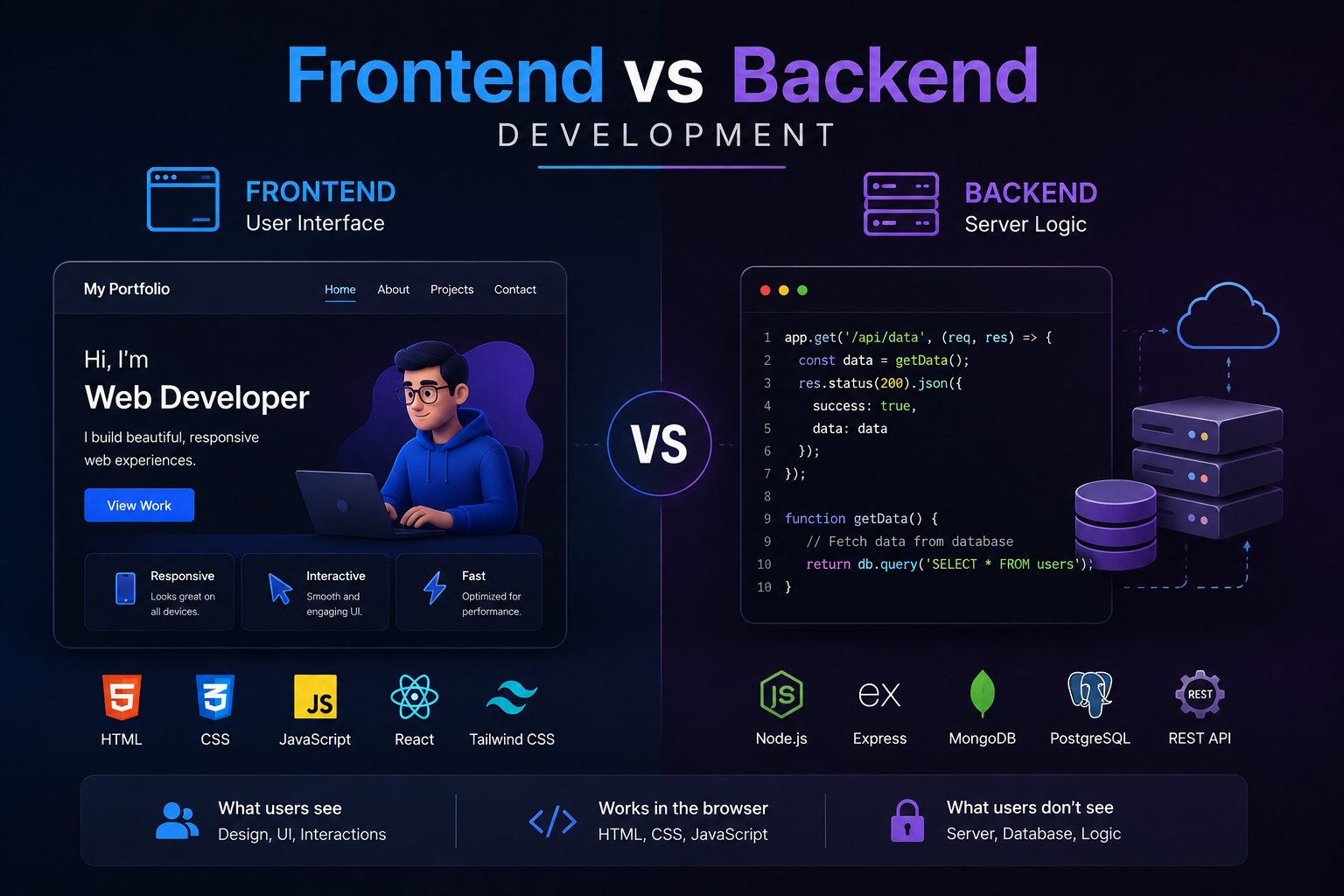
Every website or web application you have ever used is built from two distinct layers that work together invisibly. The part you see and interact with — the layout, the buttons, the animations, the forms — is the frontend. The part that processes your data, talks to databases, and sends information back to your screen is the backend. Understanding the difference between frontend and backend development is foundational knowledge for anyone commissioning a web project, hiring developers, or considering a career in web development.
This guide breaks down both sides of the stack clearly — what each layer does, what technologies power it, how the two connect, and where specific languages like Python, PHP, Java, and JavaScript sit within this picture.
What Is Frontend Development?
Frontend development, sometimes written as front-end development, refers to everything a user directly sees and interacts with in a browser or app. It translates design files and data into a visual, interactive experience. When you scroll through a product page, click a dropdown menu, or watch an image carousel animate, you are experiencing frontend code executing in real time inside your browser.
Frontend engineers work at the intersection of design and engineering. Their code has to be visually accurate, functionally reliable, and performant across different browsers, screen sizes, and devices simultaneously. A frontend that looks perfect on a desktop but breaks on a mobile phone is a failed frontend, regardless of how clean the code is.
Core Frontend Technologies
Three technologies form the foundation of every frontend on the web. They are not optional and they are not interchangeable — each one has a distinct role.
HTML (HyperText Markup Language) — defines the structure and content of a page. Every heading, paragraph, image, and link starts as HTML.
CSS (Cascading Style Sheets) — controls the visual presentation. Colours, fonts, spacing, layout, and animations are all CSS.
JavaScript — adds interactivity and dynamic behaviour. Form validation, live search, modals, and real-time updates are powered by JavaScript running in the browser.
Beyond these three fundamentals, modern frontend development relies heavily on frameworks and libraries that accelerate development and bring structure to complex applications. React, developed by Meta, is currently the dominant frontend library. Vue.js and Angular are strong alternatives. Next.js, built on top of React, has become a preferred choice for production applications that need server-side rendering and strong SEO performance — it is the framework Munix Studio uses for client projects.
What Is Backend Development?
Backend development refers to the server-side layer of a web application — the infrastructure and logic that runs on a server rather than in the user's browser. The backend receives requests from the frontend, processes them, interacts with databases and external services, and sends responses back. None of this is visible to the user, but without it, the frontend is just a static page with nowhere to send data and nothing dynamic to display.
When you log into an account, the frontend collects your email and password and sends them to the backend. The backend checks those credentials against a database, generates an authentication token, and sends it back to the frontend, which then stores it and uses it for subsequent requests. That entire sequence happens in milliseconds and is entirely backend work.
Core Backend Technologies
The backend has more technology variety than the frontend because there is no browser to standardise around. Developers choose backend languages and frameworks based on performance requirements, team expertise, and the nature of the application being built.
Languages — Python, PHP, Java, Node.js (JavaScript on the server), Ruby, Go, and C# are all common backend choices.
Frameworks — Django and Flask for Python, Laravel for PHP, Spring for Java, Express for Node.js, and Rails for Ruby.
Databases — MySQL, PostgreSQL, and SQLite for relational data; MongoDB, Redis, and DynamoDB for non-relational use cases.
Servers and infrastructure — Apache, Nginx, and cloud platforms like AWS, Google Cloud, and Azure where backend applications are hosted and scaled.
APIs — REST and GraphQL interfaces that define how the frontend and backend communicate with each other and with third-party services.
Frontend vs Backend: A Direct Comparison
Aspect Frontend Backend Where it runs User's browser or device Server or cloud infrastructure Visible to user Yes — everything on screen No — hidden server-side logic Core languages HTML, CSS, JavaScript Python, PHP, Java, Node.js, Ruby, Go Primary concern UI, UX, visual accuracy, performance Data processing, security, scalability Communicates with The backend via APIs Databases, external services, frontend Key frameworks React, Vue, Angular, Next.js Django, Laravel, Express, Spring Testing focus Cross-browser, responsive, accessibility Unit tests, load testing, security audits Database interaction Never directly Always — core responsibility
The Key Differences Between Frontend and Backend Development in Plain Terms
The table above gives you the technical breakdown. This section explains the same differences in plain terms that anyone, not just developers, can use when making decisions about a web project.
The difference in what each team sees every day
A frontend developer opens their browser constantly. They measure their work by how things look and feel. Does the button animate smoothly? Does the layout break at 375 pixels wide? Does the form feel fast to fill in on a phone? Their feedback loop is visual and immediate. They can see whether something is working within seconds of making a change.
A backend developer rarely opens a browser to test their work. They measure their work by whether data flows correctly, whether the system handles 10,000 simultaneous requests without degrading, whether an error in one part of the system fails gracefully without taking everything else down with it. Their feedback loop is logs, monitoring tools, and test suites. Success is invisible to the end user, which is exactly how it should be.
The difference in what breaks when something goes wrong
When the frontend breaks, users see it immediately. A broken layout, a button that does nothing when clicked, a form that will not submit. The impact is visible but usually contained to the affected page or feature.
When the backend breaks, users might see nothing obvious at first, but the consequences are often broader. A database that stops responding means no page in the application can load dynamic content. An authentication service that fails means nobody can log in. A payment processing error means every transaction fails silently. Backend failures tend to be invisible in their cause but wide in their effect.
The difference in how each side is tested
Frontend testing focuses on what users experience. Does the interface look correct in Chrome and Safari? Does it pass accessibility checks for screen readers? Does the interactive behaviour work as expected when a user clicks, types, or navigates? Tools like Playwright and Cypress simulate real browser interactions to catch these problems before users do.
Backend testing focuses on what the system does with data. Does the API return the correct response when given valid input? Does it handle invalid input without crashing? Does it perform acceptably when a thousand users hit the same endpoint simultaneously? Unit tests, integration tests, and load tests are the primary tools. The browser is largely irrelevant to this process.
How Frontend and Backend Connect
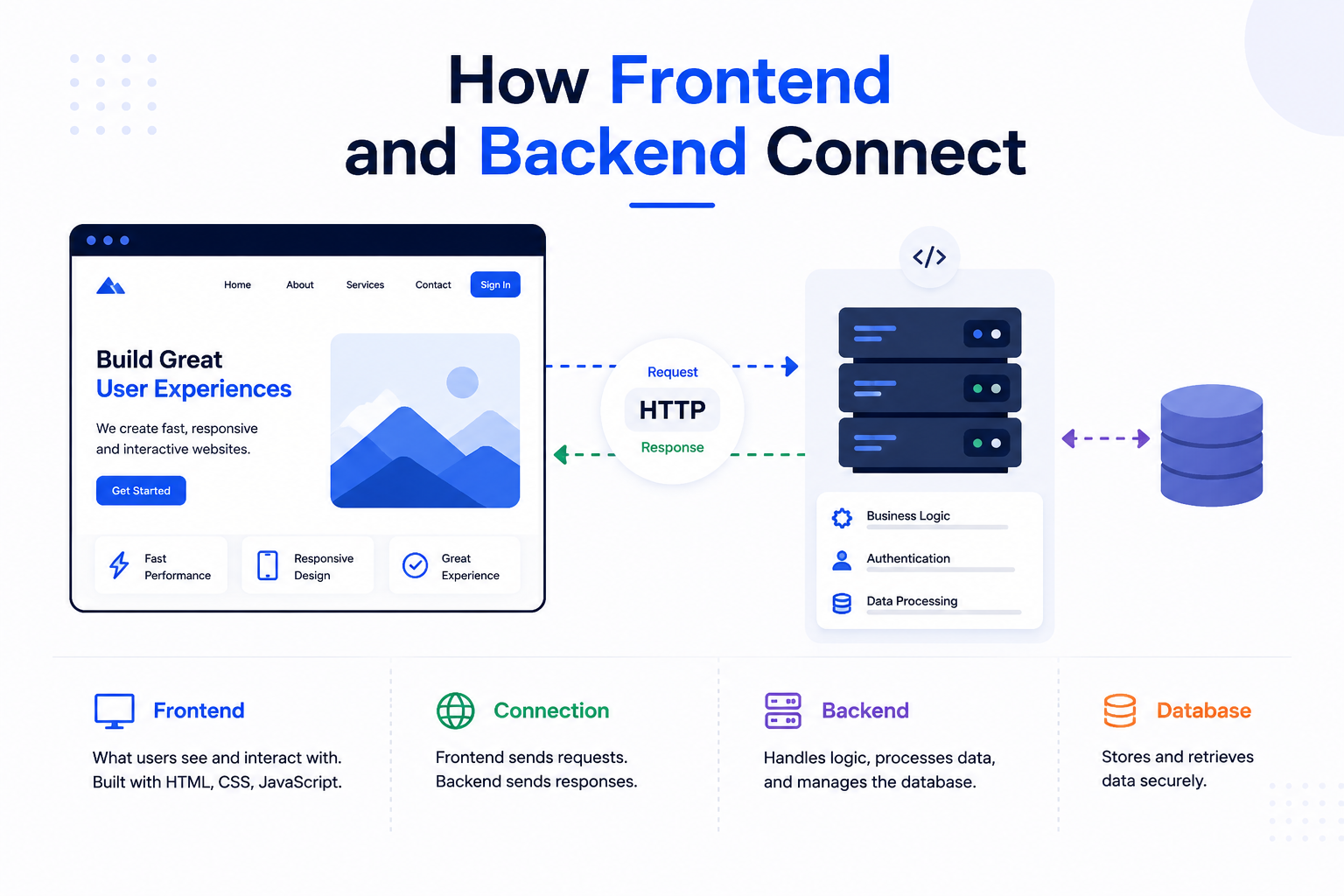
The frontend and backend communicate through APIs — Application Programming Interfaces. In modern web development, this almost always means a REST API or a GraphQL API. The frontend makes HTTP requests to specific API endpoints on the backend server, the backend processes those requests and queries its database if needed, then returns a response — typically formatted as JSON — which the frontend uses to update what the user sees.
Consider a search feature on an e-commerce site. When you type in the search box and press enter, the frontend captures your input and sends a GET request to something like /api/products?query=shoes. The backend receives that request, queries the product database for matching results, and returns a JSON array of products. The frontend then renders those results as product cards on screen. That entire round trip — from keypress to rendered results — typically takes under 200 milliseconds on a well-built system.
WebSockets are an alternative to standard HTTP requests for applications that need real-time two-way communication — chat applications, live dashboards, and collaborative tools like Google Docs use WebSockets to push updates from server to client instantly rather than waiting for the frontend to request them.
Where Specific Languages Sit: Frontend or Backend?
One of the most common sources of confusion for people new to web development is where specific languages fit within this picture. The answer is not always obvious because some languages can appear in both contexts, and some frameworks blur the line further. The table below gives a clear classification.
Language / Technology Frontend or Backend? Notes JavaScript Both Runs in the browser (frontend) and on the server via Node.js (backend) Python Backend Used with Django or Flask for server-side logic; not a browser language PHP Backend Server-side scripting language; powers WordPress and Laravel applications Java Backend Enterprise backend development; Spring framework; also used in Android apps Node.js Backend JavaScript runtime for server-side development; not a browser technology Django Backend Python web framework; handles routing, databases, and server logic HTML Frontend Structure and content markup; rendered by browsers only CSS Frontend Visual styling; always browser-side React / Vue / Angular Frontend JavaScript UI frameworks that run in the browser WordPress (theme layer) Both PHP backend with HTML/CSS/JS frontend; theme files span both layers SQL (MySQL, PostgreSQL) Backend Database query language; never runs in the browser
A Note on JavaScript's Unique Position
JavaScript deserves special mention because it is the only language that runs natively in both environments. In the browser, JavaScript powers all frontend interactivity. On the server, Node.js — a runtime built on Chrome's V8 engine — allows JavaScript to run backend logic, handle HTTP requests, and interact with databases. This is why JavaScript is so central to full stack development. A developer who knows JavaScript well can theoretically build both layers of a web application, though depth in one area often comes at the expense of the other.
Frontend vs Backend: Responsibilities and Skill Sets
Beyond technologies, frontend and backend development demand genuinely different skill orientations. Neither is technically harder than the other — they are hard in different ways.
What Frontend Developers Focus On
Translating design mockups into pixel-accurate, responsive layouts across screen sizes.
Writing performant JavaScript that does not block rendering or degrade page speed.
Managing application state — what data is loaded, what the user has selected, what needs to refresh — in a way that keeps the interface consistent.
Accessibility — ensuring the interface is usable by people with visual, motor, or cognitive impairments.
Cross-browser compatibility and ensuring consistent behaviour across Chrome, Firefox, Safari, and Edge.
What Backend Developers Focus On
Designing database schemas that store data efficiently and support the queries the application needs.
Building APIs that are secure, well-documented, and consistent in their response structure.
Handling authentication and authorisation — who can log in, and what each user is permitted to do.
Writing server logic that handles edge cases, validates input, and fails gracefully when something goes wrong.
Performance and scalability — ensuring the application handles traffic spikes without degrading or going down.
Frontend and Backend Parallel Development: How Teams Work Simultaneously
On most professional web projects, frontend and backend development do not happen sequentially. They happen in parallel. One team builds the interface while another team builds the server-side systems that the interface will eventually connect to. This parallel working model speeds up delivery but requires careful coordination to avoid the teams building toward incompatible assumptions.
The API contract as the coordination mechanism
The document that makes parallel development possible is the API contract. This is a formal specification, usually written before any significant development begins, that defines exactly how the frontend and backend will communicate. It specifies every API endpoint, the structure of the request each one expects, the structure of the response each one returns, and the error codes and messages that indicate different failure states.
With an agreed API contract in place, the frontend team can build and test the interface against a mock API that returns the expected data structures before the real backend is complete. The backend team can build and test the server logic independently, knowing exactly what structure the frontend will expect in the responses it receives. Both teams make progress simultaneously and the two sides connect cleanly when the real backend is ready.
Without a defined API contract, parallel development leads to integration problems. The frontend team builds around one assumption about the response structure. The backend team delivers a different structure. The integration phase becomes a debugging exercise rather than a connection of two complete systems.
Feature flags and staged integration
On larger projects, even individual features are developed in parallel using feature flags. A feature flag is a conditional in the code that turns a feature on or off based on a configuration value. This allows frontend code for a new feature to be deployed to production in a hidden state while the backend work is still in progress. When both sides of a feature are complete and tested, the flag is turned on and the feature becomes visible to users. This approach keeps both teams moving at full pace without blocking on each other's progress.
When parallel development breaks down
The most common failure mode in parallel frontend and backend development is scope drift. The backend team encounters an unforeseen technical constraint and changes the API response structure mid-project. The frontend team, having built around the originally specified structure, now has to refactor components that were already complete. This is expensive in both time and morale.
The solution is treating the API contract as a formal change control document. Any change to the agreed API structure requires explicit communication and agreement from both teams before implementation, not a unilateral decision by the backend team followed by a message in Slack. Projects that enforce this discipline consistently deliver on time. Projects that treat the API contract as a rough guide do not.
Backend Infrastructure: Servers, Databases, and APIs
The backend is not just application code. It includes the infrastructure that code runs on — the servers, the databases, the caching layers, and the services that keep everything connected and operational. Understanding backend infrastructure means understanding the difference between a web server (like Nginx, which handles incoming HTTP requests and routes them to the application) and the application server itself (which runs your Python, PHP, or Node.js code). These are often separate processes even when they run on the same physical or virtual machine.
Modern backend infrastructure increasingly lives in the cloud rather than on dedicated physical hardware. AWS, Google Cloud Platform, and Microsoft Azure allow teams to provision servers, managed databases, and caching layers on demand and scale them based on actual traffic. This shift has changed what backend developers need to know — cloud architecture and deployment pipelines are now core backend skills, not optional extras.
Backend Infrastructure Components
Component Role Common Examples Web Server Routes HTTP requests to the application Nginx, Apache Application Server Runs backend application logic Gunicorn, PM2, Puma Relational Database Structured data storage with relationships PostgreSQL, MySQL, SQLite Non-Relational Database Flexible schema for unstructured data MongoDB, DynamoDB, Firestore Cache Layer Stores frequent queries in memory for speed Redis, Memcached Message Queue Handles async tasks and background jobs RabbitMQ, Celery, AWS SQS API Gateway Manages and secures API traffic AWS API Gateway, Kong, Apigee
Server vs Backend vs Database: What Each One Actually Means
These three terms are used interchangeably in casual conversation but they refer to different things. Clarifying the distinction removes a significant source of confusion for anyone learning how web applications work or trying to communicate clearly with a development team.
What a server is
A server is a computer, or a virtual machine running on cloud infrastructure, that stays connected to the internet and responds to incoming requests. It is hardware and operating system layer. When someone says "the server is down," they mean the machine itself is not responding to requests, regardless of what software is running on it.
What the backend is
The backend is the software running on the server. It is the application code, the framework, the business logic, the authentication system, and the API layer. When someone says "there is a backend bug," they mean something in the application code is behaving incorrectly, not that the physical server has failed. A server can be running perfectly while the backend application on it has errors. The backend uses the server as its environment but is not the same thing as the server.
What the database is
The database is a separate system that the backend connects to for storing and retrieving persistent data. The database runs on its own server, which may be the same machine as the backend application or, more commonly in production, a separate managed service. The backend queries the database when it needs to read or write data. The database itself contains no business logic and no API. It simply stores data and responds to queries.
How the three relate in a real web application
When a user submits a contact form on a website, the sequence works like this. The user's browser sends an HTTP request to the server. The server receives the request and passes it to the backend application running on it. The backend application validates the form data, formats it, and sends a query to the database to store the submission. The database stores the record and returns a confirmation to the backend. The backend sends a response back through the server to the user's browser confirming the form was received.
The server is the machine. The backend is the application on that machine. The database is the storage system the application uses. All three exist on the same side of the web, which is the server side, and none of them are visible to or directly accessible by the user's browser.
Frontend Tech Stacks: What Gets Used in Production
The frontend tech stack on a modern production application goes well beyond HTML, CSS, and vanilla JavaScript. Real-world frontend engineering involves a chain of tools that handle module bundling, type safety, styling, testing, and deployment.
Layer Purpose Common Tools UI Framework Component-based UI development React, Vue, Angular, Svelte Meta Framework SSR, routing, and optimisation Next.js, Nuxt, SvelteKit Type System Catches errors before runtime TypeScript Styling Component and page styling Tailwind CSS, CSS Modules, Styled Components State Management Managing shared application data Redux, Zustand, Pinia Build Tool Bundles and optimises code for production Vite, Webpack, esbuild Testing Unit, integration, and E2E testing Jest, Vitest, Playwright, Cypress
Why This Distinction Matters for Your Web Project
If you are commissioning a web application, understanding the frontend-backend split helps you ask better questions and make smarter decisions. A project that looks visually simple — a clean marketing site with a contact form — may have complex backend requirements if it needs to integrate with a CRM, process payments, or serve dynamic personalised content. Conversely, a data-heavy internal dashboard might require sophisticated backend logic but a relatively straightforward frontend.
Misunderstanding this split leads to underestimating scope, hiring the wrong specialist, or ending up with a project where the frontend and backend were built independently with no thought given to how they communicate. A well-scoped project defines both layers upfront, makes deliberate technology choices for each, and builds the API contract between them before significant development begins.
At Munix Studio, every project starts with a technical discovery phase where both the frontend and backend requirements are defined together. This prevents the most common and costly mistake in web development — building one layer without a clear understanding of what the other needs to do.
Backend Website Management: What It Involves and Who Does It
Backend website management refers to the ongoing work of keeping the server-side layer of a website or web application running correctly, securely, and at the required performance level. It is a distinct discipline from frontend management, which covers the visual and interactive elements users see, and it is often invisible to website owners until something goes wrong.
What backend website management covers
Server maintenance is the first category. This includes ensuring the operating system and server software are kept up to date with security patches, monitoring server resource usage so the application does not run out of memory or processing capacity, and configuring automatic scaling on cloud platforms so the server can handle traffic spikes without going down.
Database management is the second category. Databases need regular backups so data can be recovered if a failure occurs. They need performance monitoring to identify slow queries that are degrading application speed. They need index optimisation as the data volume grows. And they need schema migrations managed carefully when the application requires changes to the database structure.
Application updates are the third category. The backend framework, its dependencies, and any third-party libraries the application uses all release updates that include security patches, bug fixes, and performance improvements. Keeping these current without introducing compatibility problems requires testing and a defined update process.
Security monitoring is the fourth category. Backend systems handle sensitive data, authentication credentials, and business logic that represents a target for attackers. Monitoring for unusual API traffic patterns, failed authentication attempts, and known vulnerability patterns in dependencies is ongoing backend management work.
Who is responsible for backend website management
On small projects, a single developer often handles both the frontend interface and the backend management. On larger projects, backend management is typically handled by a dedicated DevOps engineer or a site reliability engineer who focuses on infrastructure and operational health rather than feature development. Managed hosting platforms like AWS Elastic Beanstalk, Heroku, or Railway handle some backend management automatically, reducing the operational burden on development teams. Maintenance and support contracts with a development agency are an option for businesses that need reliable backend management without an in-house team to provide it.
Related Services
Whether your project needs a polished frontend, a scalable backend, or both layers built and integrated from scratch, Munix Studio has the technical depth to deliver it properly. Explore the services most relevant to your project below.
Website Development — Full-stack web development using React and Next.js on the frontend with scalable backend architecture built to handle your application's specific data and logic requirements.
App Development — Mobile and web app development where frontend and backend are designed together from day one, with a clear API contract ensuring both layers work seamlessly at scale.
UI/UX Design — Frontend-focused design work that produces component libraries and design systems your development team can implement accurately and efficiently.
DevOps and Cloud — Backend infrastructure setup, deployment pipelines, cloud hosting, and the operational layer that keeps your application running reliably in production.
Dedicated Developers — Hire frontend or backend specialists from Munix Studio to embed in your existing team, bringing deep technical expertise to whichever layer your project needs most.
Frequently Asked Questions
Ready to Get Started?
Website Development
Full-stack web development with React and Next.js on the frontend and scalable server-side architecture on the backend, built as a unified system from the first line of code.
Explore Website DevelopmentApp Development
Web and mobile application development where frontend and backend are architected together, with a clean API contract ensuring both layers communicate efficiently at any scale
Explore App DevelopmentUI/UX Design
Frontend-focused design that produces component libraries and interaction specifications your development team can implement with precision across every screen and state.
Explore UI/UX DesignDevOps and Cloud
Backend infrastructure, cloud deployment, and production operations — the server-side layer that keeps your application running reliably under real traffic conditions.
Explore DevOps and CloudDedicated Developers
Frontend or backend specialists available to embed in your team, bringing focused technical depth to whichever layer of your project needs the most attention.
Explore Dedicated DevelopersRelated Articles
What is Website Development? The Complete Guide for Beginners
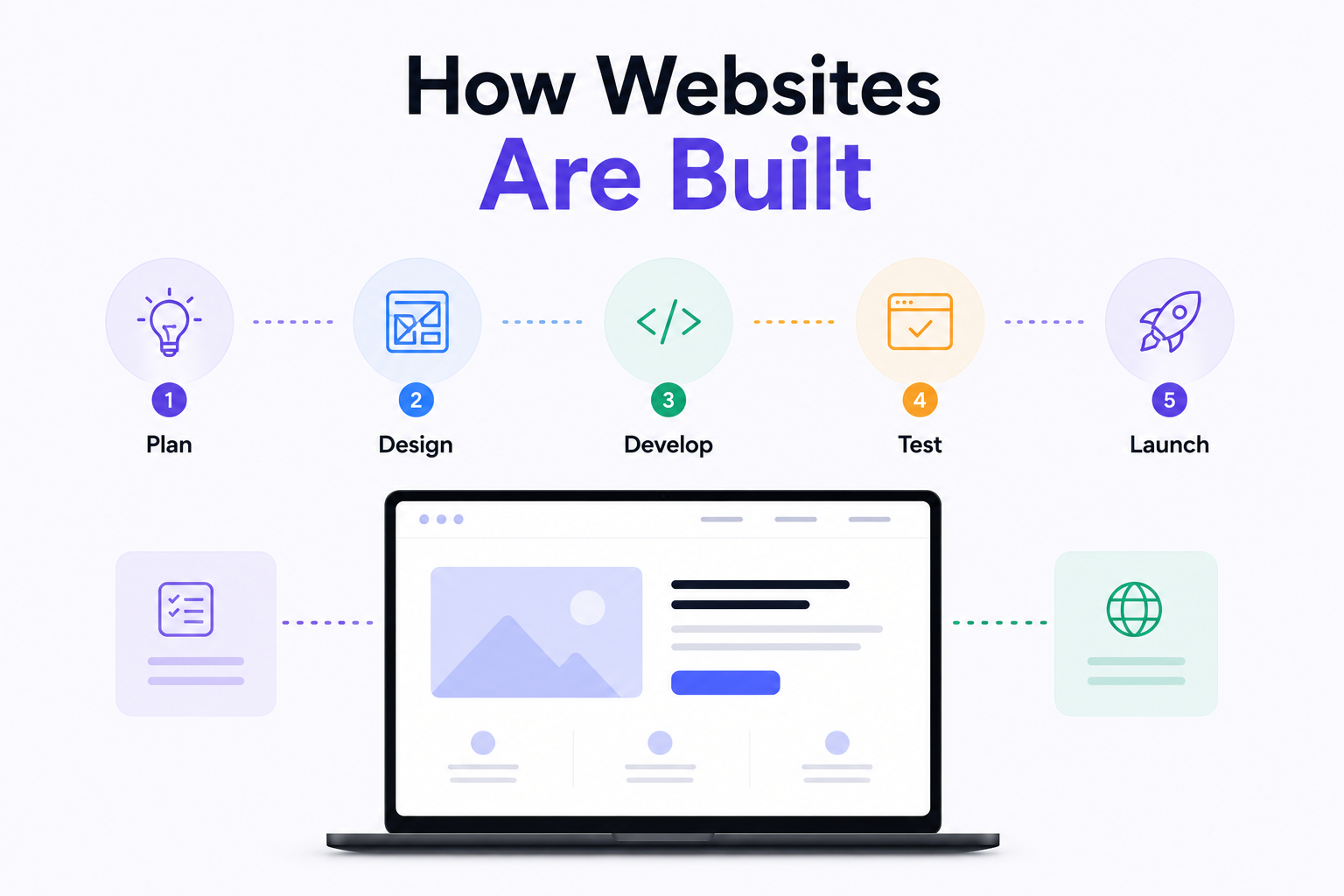
How Are Modern Websites Built in 2026?

Website Development Process & Life Cycle : Complete Guide
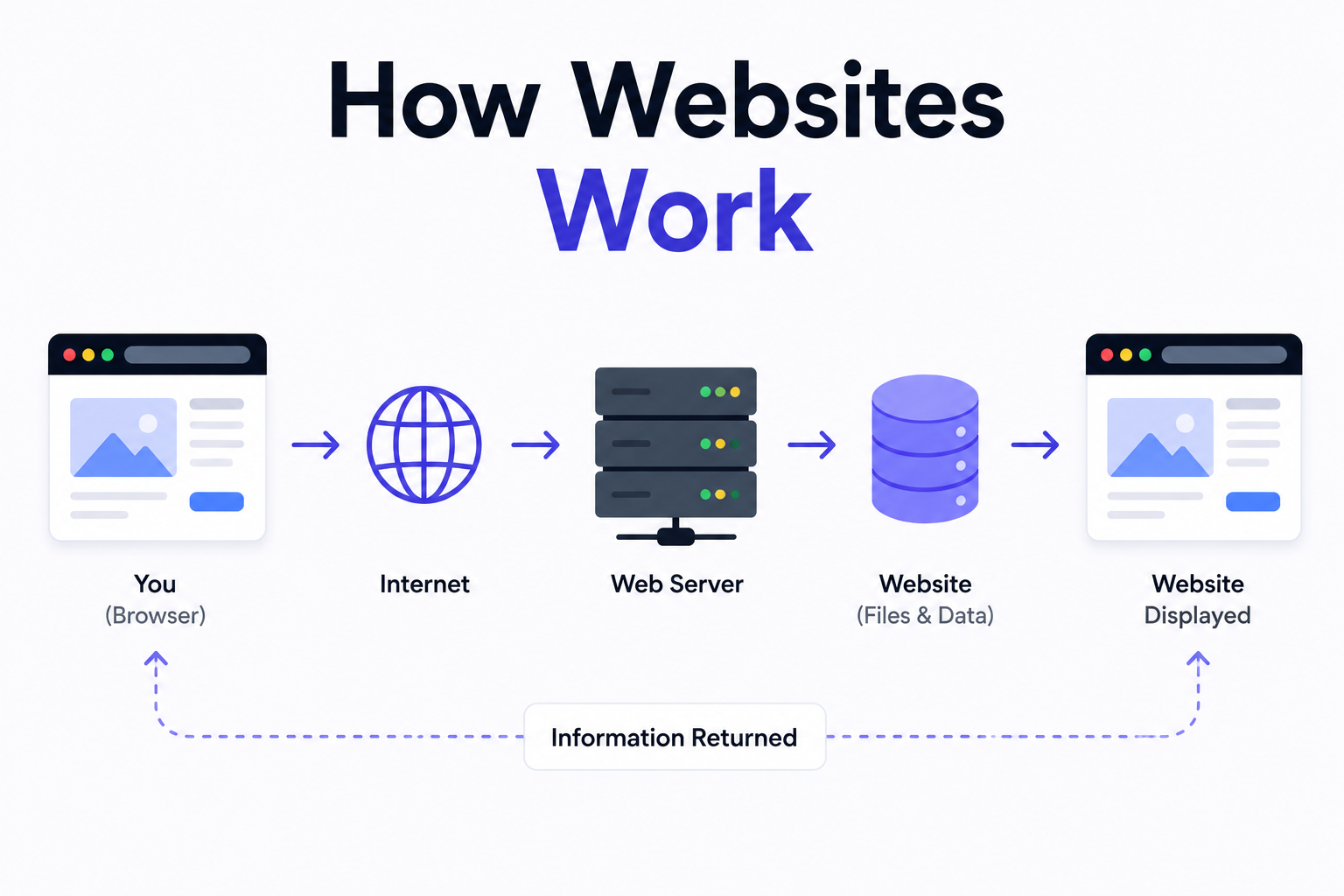
How Websites Work: DNS, Servers, Browsers
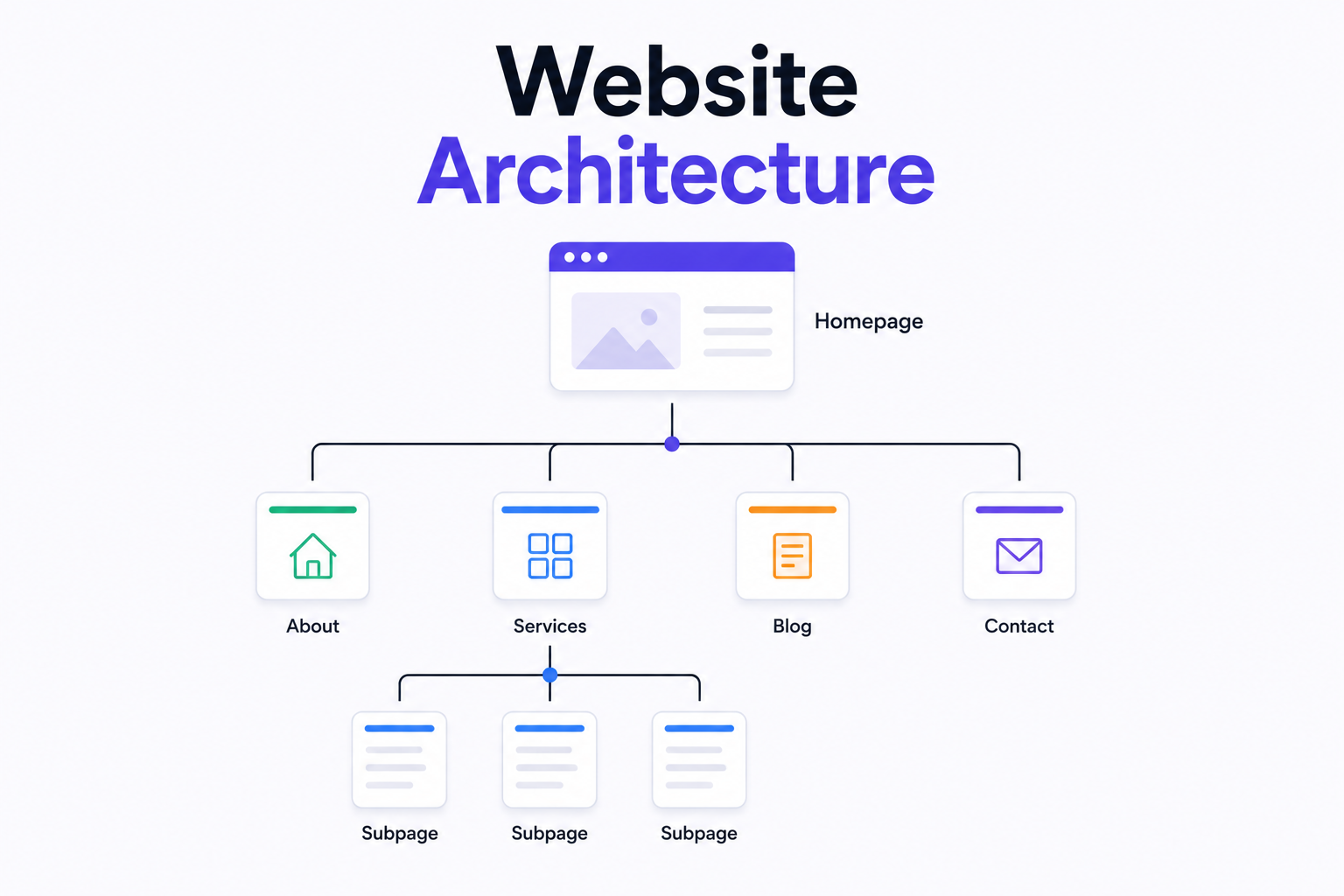
What is Website Architecture? Best Practices