Every website and application you use is built in two distinct layers. There is the part you see — the buttons, the layouts, the forms, the animations — and there is the part you never see — the servers, the databases, the logic that processes your actions and stores your data. These two layers have names: the frontend and the backend. Together they form the complete architecture of every digital product in existence, from a simple blog to a global e-commerce platform handling millions of transactions per day.
Understanding what each layer does, how they differ from each other, and how they communicate is foundational knowledge for anyone working in web development, hiring developers, or making technical decisions about a digital product. This guide covers all of it — from the basic definitions through to how the two layers connect, how they are deployed, and what the practical implications are for building real applications.
What Is Frontend Development?
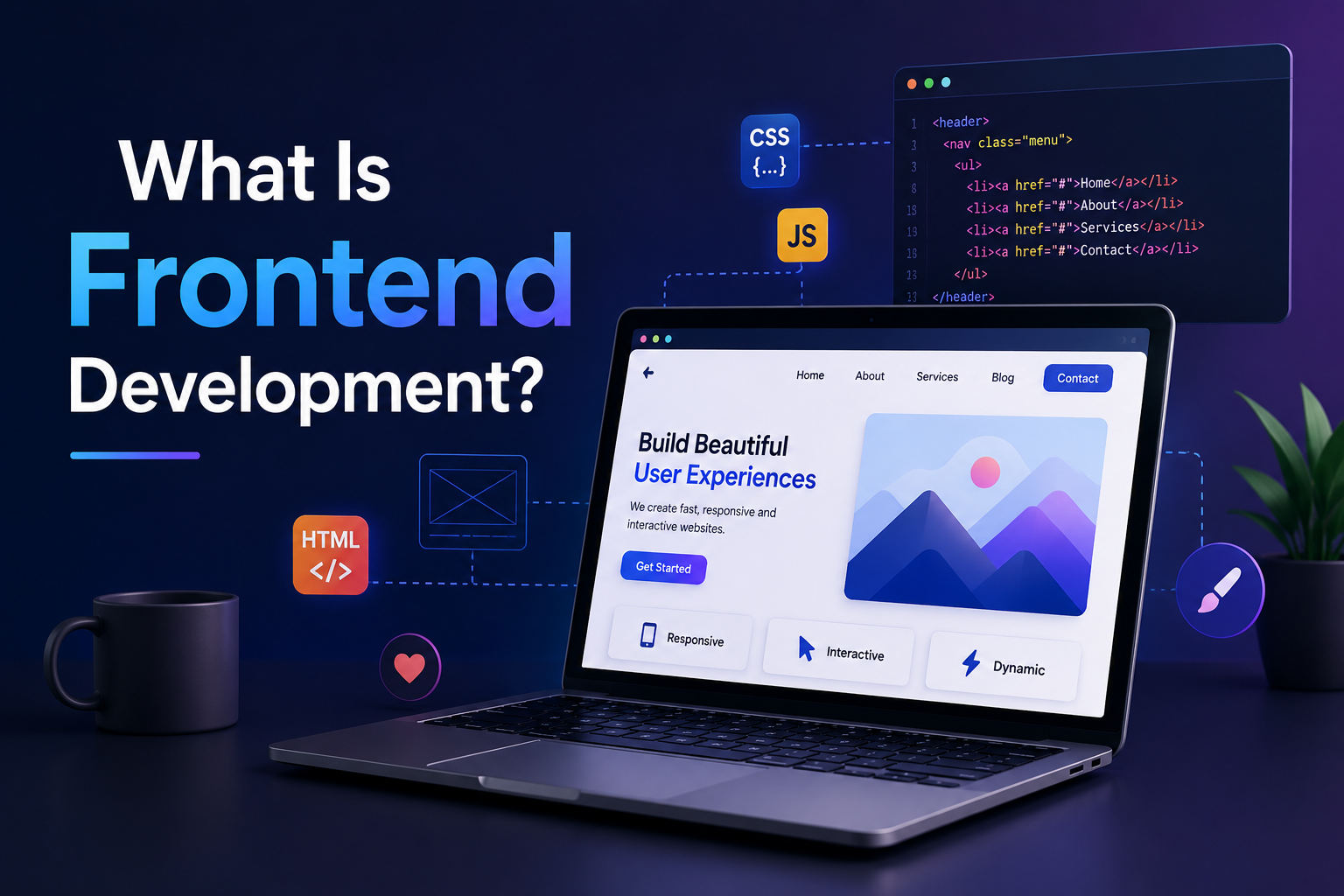
Frontend development is the practice of building everything a user directly sees and interacts with. When you open a website and a page loads — with its layout, typography, colours, images, navigation menu, and interactive elements — everything you are looking at was produced by frontend development. When you click a button and something happens on screen, when a form validates your input as you type, when a page transition animates smoothly between views — all of that is frontend behaviour.
The defining characteristic of frontend code is where it runs: in the user's browser. Browsers have a JavaScript engine, an HTML parser, and a CSS rendering engine built into them. Frontend code is written in languages these engines understand and execute directly. This is why frontend development has a fixed set of native languages — HTML, CSS, and JavaScript — that no other discipline in web development shares.
Frontend development sits at the intersection of design and engineering. A frontend developer must understand visual hierarchy, typography, colour, interaction design, and accessibility well enough to implement interfaces that are both technically correct and genuinely usable. At senior levels, frontend engineering also involves performance optimisation — controlling how fast pages load, how smoothly they respond to interaction, and how efficiently they use network resources.
What Does a Frontend Developer Do?
A frontend developer translates design into functional browser interfaces. Their work begins with design files — typically from Figma, Sketch, or Adobe XD — and ends with a working implementation in the browser that matches the design accurately, responds correctly to user actions, and performs well across different devices and screen sizes. The specific activities involved include writing HTML for page structure, CSS for visual styling and responsive layout, and JavaScript for interactivity and dynamic content.
In modern product development, frontend developers work primarily within JavaScript frameworks rather than writing vanilla JavaScript directly. React is the dominant choice across most industries, used by companies including Meta, Airbnb, Netflix, and Atlassian. Vue.js is widely used in Asia and among teams that prioritise a lower learning curve. Angular is prevalent in enterprise environments, particularly financial services and government contexts. These frameworks provide component-based architecture, state management, and tooling that make large-scale frontend applications maintainable in ways that plain JavaScript struggles to achieve at scale.
Beyond framework work, frontend developers are responsible for consuming backend APIs — making requests to server endpoints and using the returned data to update what the user sees. This API integration is the primary technical touchpoint between frontend and backend work, and understanding it is essential for any frontend developer working on a real application.
Core Frontend Technologies
Technology Type Role in Frontend Runs In HTML Markup language Page structure and content Browser CSS Styling language Visual presentation and layout Browser JavaScript Programming language Interactivity, logic, API calls Browser TypeScript Typed JS superset Type-safe JavaScript development Browser (compiles to JS) React JS framework Component-based UI architecture Browser Tailwind CSS CSS framework Utility-first styling system Browser (compiled CSS)
What Is Backend Development?
Backend development is the practice of building the systems that power an application from the server side. Everything that happens when a user takes an action — submitting a form, placing an order, logging in, loading a personalised feed — triggers backend processes that validate the input, apply business rules, read from or write to a database, and return a structured response. None of this is visible to the user; it happens on remote servers before anything reaches the browser.
The defining characteristic of backend code is where it executes: on a server, not in the user's browser. This fundamental difference means backend development is not constrained to a single language the way frontend development is. Python, Java, PHP, Node.js, Ruby, Go, and C# are all viable backend languages precisely because they all run on servers rather than needing to be understood by a browser.
App backend development encompasses a broad scope. At its core it involves building APIs — structured interfaces through which the frontend and other clients request and receive data. Beyond the API layer, backend development includes database schema design and management, authentication and authorisation systems, background job processing, third-party service integrations, and the infrastructure configuration that keeps the whole system running reliably under load.
What Does a Backend Developer Do?
A backend developer designs and builds the server-side systems that make an application actually function. Their work is less visible than frontend work but no less consequential — a poorly designed backend produces applications that lose data, fail under load, have security vulnerabilities, or respond too slowly to be usable regardless of how polished the frontend interface is.
Day to day, a backend developer writes server-side application code, designs database schemas that support the application's data access patterns efficiently, builds and documents API endpoints, implements authentication flows, writes automated tests for business logic, and reviews the architecture of new features before they are built. At senior levels, backend work increasingly involves systems design — deciding how to structure services, how to handle data at scale, how to design for fault tolerance, and how to maintain performance as the application grows.
Core Backend Technologies
Technology Type Role in Backend Runs On Node.js JS runtime API servers, real-time apps Server Python / Django Language / Framework Web apps, REST APIs, data-heavy systems Server PHP / Laravel Language / Framework Web apps, CMS, e-commerce backends Server Java / Spring Language / Framework Enterprise systems, microservices Server PostgreSQL Relational database Persistent structured data storage Database server Redis In-memory store Caching, sessions, real-time data Server
The Other Meaning of "Backend": CMS Admin Panels and Website Management
Everything covered in this guide so far uses "backend" in its software engineering sense — the server, the database, the API layer. But there's a second, entirely different meaning of the word that comes up constantly in a non-technical context, and it's worth disambiguating explicitly because the confusion is genuinely common.
When someone using WordPress, Shopify, or a similar content management system talks about "logging into the backend" or "managing the backend of my website," they usually mean the admin dashboard — the login screen where you write blog posts, upload images, update prices, or change site settings. In WordPress specifically, this is the /wp-admin area, and it's referred to as "the backend" in nearly all WordPress documentation and tutorials, despite having little to do with the server-side engineering concepts covered earlier in this guide.
This is not simply loose terminology — the CMS admin panel genuinely does sit on the "back" side of the site from a user's perspective, in the sense that ordinary visitors never see it, which is presumably how the naming convention took hold. But it's a different concept from backend development as an engineering discipline. Managing the WordPress backend means logging in, writing content, and adjusting settings through an existing interface that someone else built.
Backend development means building that interface, the database structure behind it, and the logic that powers it in the first place.
For anyone hiring for a role or a project, this distinction matters practically. "I need someone to manage my website's backend" usually means content updates and settings changes within an existing CMS — work that requires familiarity with a specific platform's admin interface, not programming skills. "I need backend development work" means building or modifying the underlying server-side systems themselves, which requires an actual backend developer working in a language like PHP, Node.js, or Python. Being clear about which one you actually need, when briefing a freelancer or agency, avoids a mismatched hire on either side.
Frontend vs Backend: Key Differences
The distinction between frontend and backend development goes beyond where the code runs. The two disciplines differ in their tools, their thinking patterns, their relationship to design, and the types of problems they are primarily concerned with solving. Understanding these differences is useful both for developers choosing a path and for teams building the right structure around a product.
Dimension Frontend Backend Where code runs User's browser Remote server Visible to user Yes — everything the user sees No — hidden behind the API layer Native languages HTML, CSS, JavaScript only Python, Java, PHP, Node.js, Go, Ruby, C# and more Primary concerns UI, UX, performance, accessibility Data, security, scalability, logic Design relationship Direct — implements visual designs Indirect — rarely touches UI Data storage Temporary — browser memory and local storage only Persistent — databases, file systems, cloud storage Security responsibility Input validation, XSS prevention Authentication, authorisation, data protection Ecosystem change pace Fast — framework churn is real Slower — core concepts are stable
How Frontend and Backend Connect
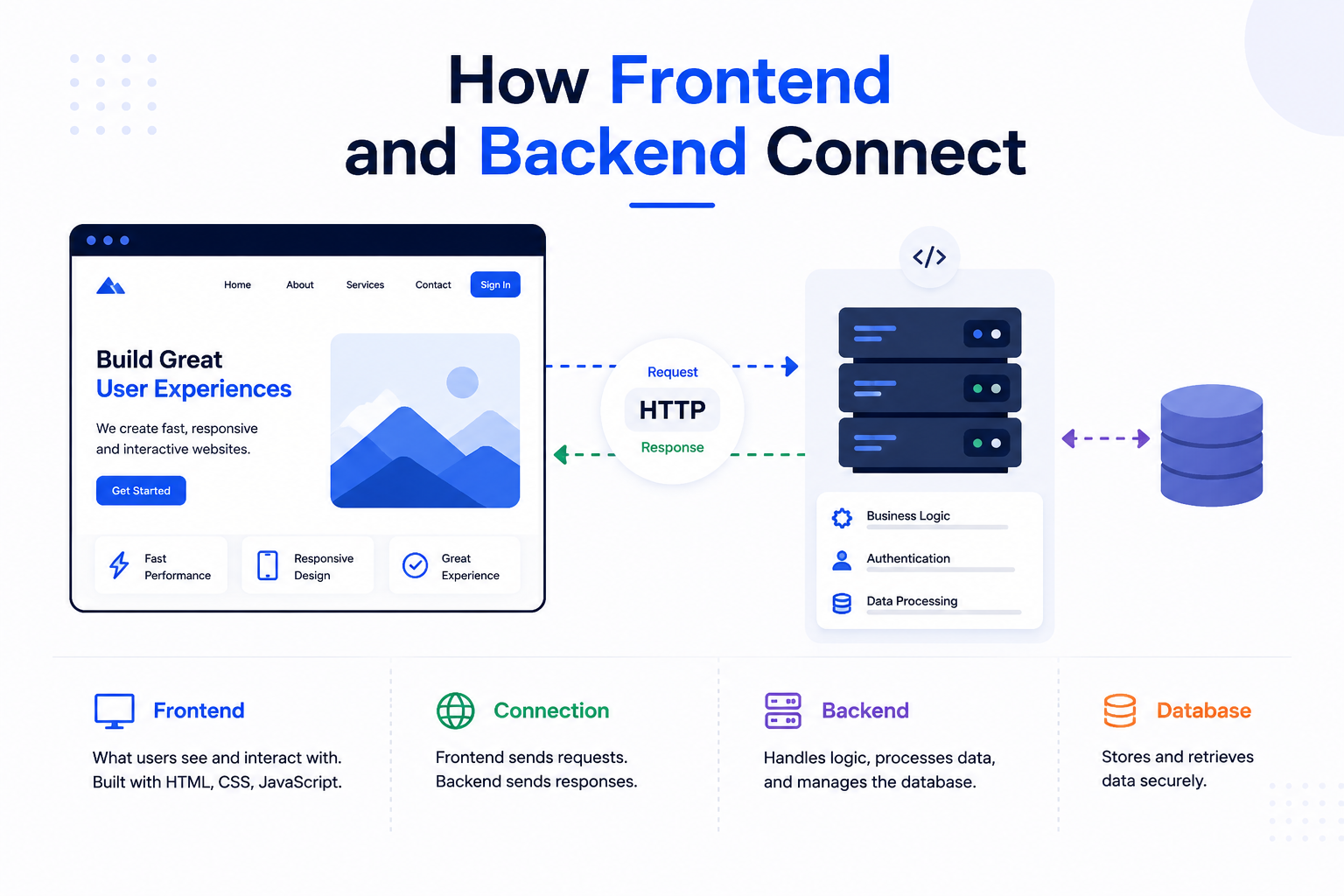
Understanding what frontend and backend each do is only half the picture. The other half — and the part that is most often glossed over in introductory explanations — is how the two layers communicate with each other. The frontend and backend are separate systems running in completely different environments: one in a browser, one on a server. For a web application to function, they need a structured, reliable way to exchange data. That mechanism is the API.
What Connects Frontend and Backend: The API
An API (Application Programming Interface) is the contract between the frontend and the backend. It defines what requests the frontend can make, what data it needs to send with each request, and what the backend will return in response. The frontend never accesses the database directly — it asks the backend for data through the API, and the backend retrieves it, applies any necessary business logic, and sends back a structured response.
In practical terms, when you log into a website, your browser sends your credentials to a backend API endpoint. The backend checks those credentials against the database, generates an authentication token if they are valid, and returns that token to the browser. The browser stores the token and includes it in subsequent requests so the backend can identify who is making them. None of this involves direct browser-to-database communication — the API layer sits between them at every step.
REST APIs
REST (Representational State Transfer) is the most widely used architectural pattern for web APIs. A REST API organises resources — users, products, orders, articles — as URLs called endpoints. The frontend interacts with these endpoints using standard HTTP methods: GET to retrieve data, POST to create new records, PUT or PATCH to update existing ones, and DELETE to remove them. Data is exchanged in JSON format in the vast majority of modern REST APIs.
A REST API for a blog application might expose endpoints like /api/posts to retrieve all posts, /api/posts/42 to retrieve a specific post, and /api/posts with a POST request to create a new one. The frontend React application makes these requests using the browser's fetch API or a library like Axios, receives the JSON response, and uses the data to update what the user sees — all without a page reload.
GraphQL APIs
GraphQL is an alternative API architecture developed at Meta and released publicly in 2015. Where REST APIs expose multiple endpoints each returning fixed data shapes, a GraphQL API exposes a single endpoint through which the frontend can request exactly the data it needs — no more and no less. This eliminates two common problems with REST APIs: over-fetching (receiving more data than needed) and under-fetching (needing multiple requests to assemble the data for a single view).
GraphQL is particularly valuable when a frontend application needs to combine data from multiple related resources in a single view, or when multiple different clients — a web app, a mobile app, a third-party integration — need the same underlying data in different shapes. Companies including GitHub, Shopify, and Twitter have adopted GraphQL for these reasons. The tradeoff is a more complex server-side implementation and a steeper learning curve than REST for developers encountering it for the first time.
WebSockets for Real-Time Communication
Standard HTTP requests — the kind used by REST and GraphQL APIs — follow a request-response pattern: the frontend sends a request, the backend sends a response, and the connection closes. This works well for most interactions but is poorly suited to real-time features where the backend needs to push data to the frontend without waiting for a request. Chat applications, live sports scores, collaborative editing tools, and real-time notifications all require a different communication model.
WebSockets provide this by establishing a persistent, bidirectional connection between the browser and the server. Once the connection is open, either side can send messages to the other at any time without the overhead of a new HTTP request. Socket.io is the most widely used library for implementing WebSocket communication in Node.js backends and JavaScript frontends. Real-time multiplayer features in applications like Figma, Notion, and Google Docs all rely on WebSocket or similar persistent connection technologies under the hood.
Communication Method Pattern Best For Data Format Used By REST API Request-Response Most standard web and app features JSON Most web applications GraphQL Query-based Complex data needs, multiple clients JSON GitHub, Shopify, Twitter WebSockets Persistent bidirectional Chat, live collaboration, notifications JSON / Binary Figma, Slack, Google Docs Server-Sent Events Server-to-client push Live feeds, AI streaming responses Text / JSON News feeds, AI chat interfaces
Web Server vs Backend Server: What Is the Difference?
The terms web server and backend server are often used interchangeably, but they describe different layers in a production application's infrastructure. A web server is software — most commonly Nginx or Apache — that handles the lowest-level concern of receiving HTTP requests from the internet and deciding what to do with them. A backend server (or application server) is the process running your actual application code — the Node.js process, the Django application, the Laravel instance — that handles the business logic and data processing.
In a typical production setup, Nginx sits in front of the application server as a reverse proxy. When a request arrives, Nginx handles SSL termination (decrypting HTTPS traffic), serves static files like images and CSS directly from disk without bothering the application server, and forwards dynamic requests to the backend application process. This separation improves performance, security, and flexibility — the web server can be configured independently from the application, and multiple application server instances can sit behind a single Nginx reverse proxy for load balancing.
In cloud and serverless environments, this distinction becomes less visible to developers because managed services handle the web server layer automatically. A Next.js application deployed on Vercel, for example, has the web server layer fully managed — Vercel's infrastructure handles SSL, CDN distribution, and routing without requiring any Nginx configuration from the development team.
How Frontend and Backend Are Deployed
Deployment — the process of taking code from a development environment and making it available to real users — works differently for frontend and backend, and the deployment approach chosen has direct implications for performance, scalability, cost, and maintenance overhead. Understanding the main deployment types helps teams make decisions that match their technical requirements and operational capacity.
Frontend Deployment
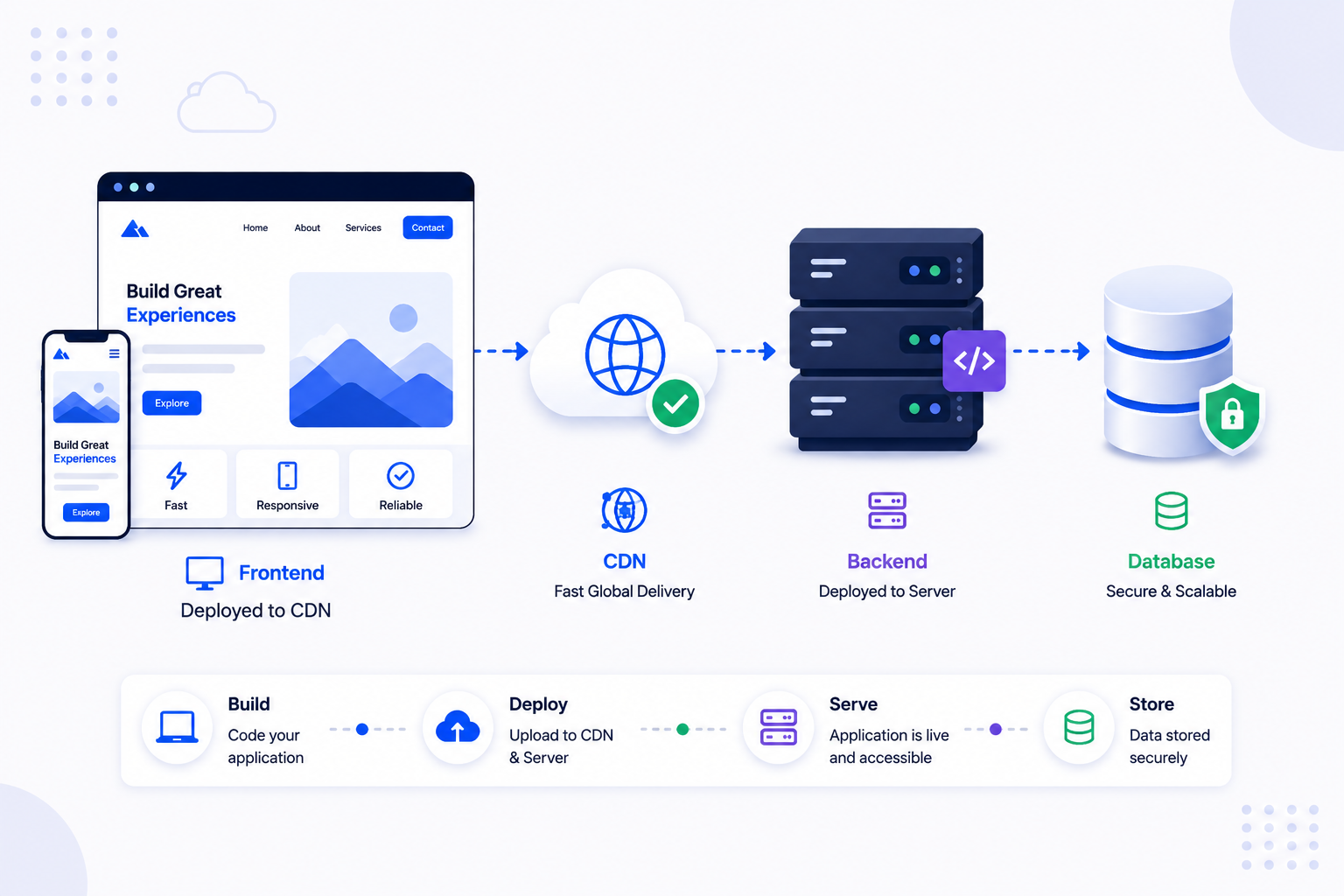
Static frontend applications — those built with React, Vue, or similar frameworks compiled to static HTML, CSS, and JavaScript files — can be deployed to a Content Delivery Network (CDN). A CDN stores copies of these files at edge locations around the world, serving them from whichever location is geographically closest to the requesting user. This produces extremely fast load times because no server-side processing is required — the browser simply receives files from a nearby cache. Vercel, Netlify, and Cloudflare Pages are platforms that handle this deployment model with minimal configuration.
Server-rendered frontend applications — those using Next.js with Server-Side Rendering, for example — require a runtime server because HTML is generated dynamically on each request rather than pre-built at deploy time. These applications are deployed to cloud platforms that run Node.js processes, such as Vercel's serverless functions, AWS Lambda, or a traditional virtual machine. The tradeoff for dynamic server rendering is slightly higher infrastructure complexity and cost in exchange for better SEO, faster initial page loads for authenticated content, and the ability to incorporate real-time server data into the initial HTML response.
Backend Deployment
Backend applications require persistent server processes to handle incoming requests, which means they cannot be deployed to a static CDN the way frontend files can. The main backend deployment approaches reflect different tradeoffs between control, cost, and operational simplicity.
Traditional server deployment involves running the backend application on a virtual machine or physical server — AWS EC2, Google Compute Engine, or a DigitalOcean Droplet. This gives full control over the server environment but requires the team to manage operating system updates, security patching, process management, and scaling manually. It is the right choice when the application has specific infrastructure requirements or when cost optimisation at scale makes managed services less economical.
Container-based deployment using Docker and Kubernetes has become the standard approach for teams that want portability and reproducibility without managing bare metal servers. Docker packages the application and its dependencies into a container that runs consistently across any environment. Kubernetes orchestrates multiple containers, handling scaling, health checks, and rolling deployments. AWS ECS, Google Kubernetes Engine, and Azure Kubernetes Service are managed Kubernetes offerings that reduce the operational overhead of running containers at scale.
Serverless deployment — using AWS Lambda, Google Cloud Functions, or Azure Functions — runs backend code in response to events without requiring a persistent server process. Each function invocation is isolated, scales automatically, and is billed only for the compute time consumed. This model is well-suited to API backends with variable or unpredictable traffic patterns but has limitations around cold start latency, maximum execution duration, and stateful operations that make it less appropriate for all backend workloads.
Frontend and Backend Deployment Types: Mobile Applications
Mobile applications introduce a different deployment model compared to web applications. The frontend of a mobile app — the React Native, Swift, or Kotlin code that produces the user interface — is deployed through app stores (Apple App Store and Google Play Store) rather than a web server or CDN. Each update to the mobile frontend requires a new app store submission and user-side update download, which creates a fundamentally different release cycle from web frontend deployments that are live the moment they are pushed.
The backend of a mobile application is deployed exactly as a web backend would be — to a server, container, or serverless environment — because it is a standard API server that the mobile app communicates with over the network. This separation means that backend changes can be deployed continuously and independently of mobile app releases, which is why most mobile app teams design their backends to be backward compatible across multiple versions of their mobile frontend simultaneously. A user running an older version of the app must still be able to communicate with the current backend API without breaking.
Deployment Type Layer Best For Scaling Operational Overhead CDN / Static Hosting Frontend Static sites, SPAs, compiled frontends Automatic Very Low Serverless Functions Frontend + Backend SSR, API routes, event-driven backend Automatic Low Container (Docker / K8s) Backend Complex backends, microservices Managed scaling Medium Virtual Machine / VPS Backend Full control, custom configurations Manual High App Store Distribution Mobile Frontend iOS and Android app releases Platform-managed Medium (review process)
Frontend as a Service (FEaaS): What It Means
Frontend as a Service, usually abbreviated FEaaS, is a category of platform that emerged as an extension of the deployment models covered above. Where a CDN like Vercel or Netlify handles hosting and delivering an already-built frontend, a Frontend as a Service platform goes further — it provides the tools to actually build the frontend itself, often without writing framework-level code from scratch, while still producing a fast, production-grade result.
The core idea behind FEaaS is decoupling the visual and interactive layer of a product from custom engineering the same way "backend as a service" platforms like Firebase or Supabase decoupled backend infrastructure from custom server code. A team using a FEaaS platform typically gets pre-built, customisable UI components, visual page building tools, built-in performance optimisation, and direct hosting, all as part of the same platform, rather than assembling a React application, a component library, a CDN, and a CI/CD pipeline as separate pieces.
Builder.io and Storyblok's visual editor are commonly cited examples of this category — both let non-developers assemble and edit frontend pages visually while developers define the underlying components those pages are built from. This sits in a similar space to the no-code and headless CMS-driven frontend approaches, but the specific "as a service" framing emphasises that the entire frontend delivery pipeline, not just content editing, is handled by the platform.
The tradeoff is the same one that applies to any "as a service" abstraction: less custom engineering effort in exchange for less low-level control. A FEaaS platform is a strong fit for marketing sites, landing pages, and content-heavy sites where a marketing team needs to make frequent visual changes without engineering involvement. It's a weaker fit for applications with highly custom interaction patterns or performance requirements that the platform's pre-built components can't accommodate, where a hand-built React or Next.js frontend, as covered throughout the rest of this guide, remains the better choice.
How Frontend and Backend Work Together in Practice
Tracing a single user action through both layers of a real application makes the relationship between frontend and backend concrete in a way that abstract descriptions cannot. Consider a user adding a product to their cart on an e-commerce website.
The moment the user clicks "Add to Cart," the frontend JavaScript captures the click event. It reads the product ID and quantity from the interface, constructs a POST request to the backend API endpoint /api/cart/items, attaches the user's authentication token to the request headers, and sends it to the server. This all happens in the browser, in milliseconds, without any page reload.
The backend receives the request. It validates the authentication token, confirms the user exists and is authorised to modify their cart, checks that the product ID is valid and the requested quantity is in stock, writes a new cart item record to the database, and returns a JSON response confirming the successful addition along with the updated cart state. The frontend receives this response, updates the cart icon in the navigation to reflect the new item count, and shows a success notification to the user. The entire cycle takes under a second, involves three separate systems — browser, application server, database — and is invisible to the user beyond the cart icon updating.
This is how every meaningful interaction in every web application works. The frontend handles the user-facing moment; the backend handles the data reality behind it. Neither layer could produce a complete application alone. The API is the bridge that makes their collaboration possible.
Related Services
Whether you need frontend expertise, backend engineering, or a team that covers the complete stack, Munix Studio builds across all layers of web and app development:
Website Development — Full stack web development spanning React and Next.js frontend interfaces through to API design, database architecture, and server-side logic — built as a complete, integrated system rather than disconnected layers.
App Development — Mobile and web application development covering both the frontend client interface and the backend API and database infrastructure that powers it — including the deployment architecture that keeps both layers running reliably.
Dedicated Developers — Frontend specialists, backend engineers, and full stack developers available on a dedicated basis — matched to your stack, your existing team structure, and the specific layer of the application you need to strengthen.
DevOps and Cloud — Deployment infrastructure for both frontend and backend layers — including CDN configuration, container orchestration, serverless function setup, CI/CD pipelines, and the monitoring systems that keep production environments healthy.
UI/UX Design — Frontend-ready design produced by designers who understand the browser environment and work in close coordination with frontend developers — so what is designed is what gets built.
Frequently Asked Questions
Ready to Get Started?
Website Development
Full stack web development spanning React and Next.js frontend interfaces through to API design, database architecture, and server-side logic — built as a complete, integrated system.
Explore Website DevelopmentApp Development
Mobile and web application development covering frontend client interfaces and the backend API and database infrastructure that powers them — including deployment architecture for both layers.
Explore App DevelopmentDedicated Developers
Frontend specialists, backend engineers, and full stack developers available on a dedicated basis — matched to your stack and the specific layer of your application you need to strengthen.
Explore Dedicated DevelopersDevOps and Cloud
Deployment infrastructure for frontend and backend layers — CDN configuration, container orchestration, serverless setup, CI/CD pipelines, and production monitoring.
Explore DevOps and CloudUI/UX Design
Frontend-ready design produced by designers who understand the browser environment and work in close coordination with frontend developers — so what is designed is what gets built.
Explore UI/UX DesignRelated Articles
What is Website Development? The Complete Guide for Beginners
How Are Modern Websites Built in 2026?
Website Development Process & Life Cycle : Complete Guide
How Websites Work: DNS, Servers, Browsers
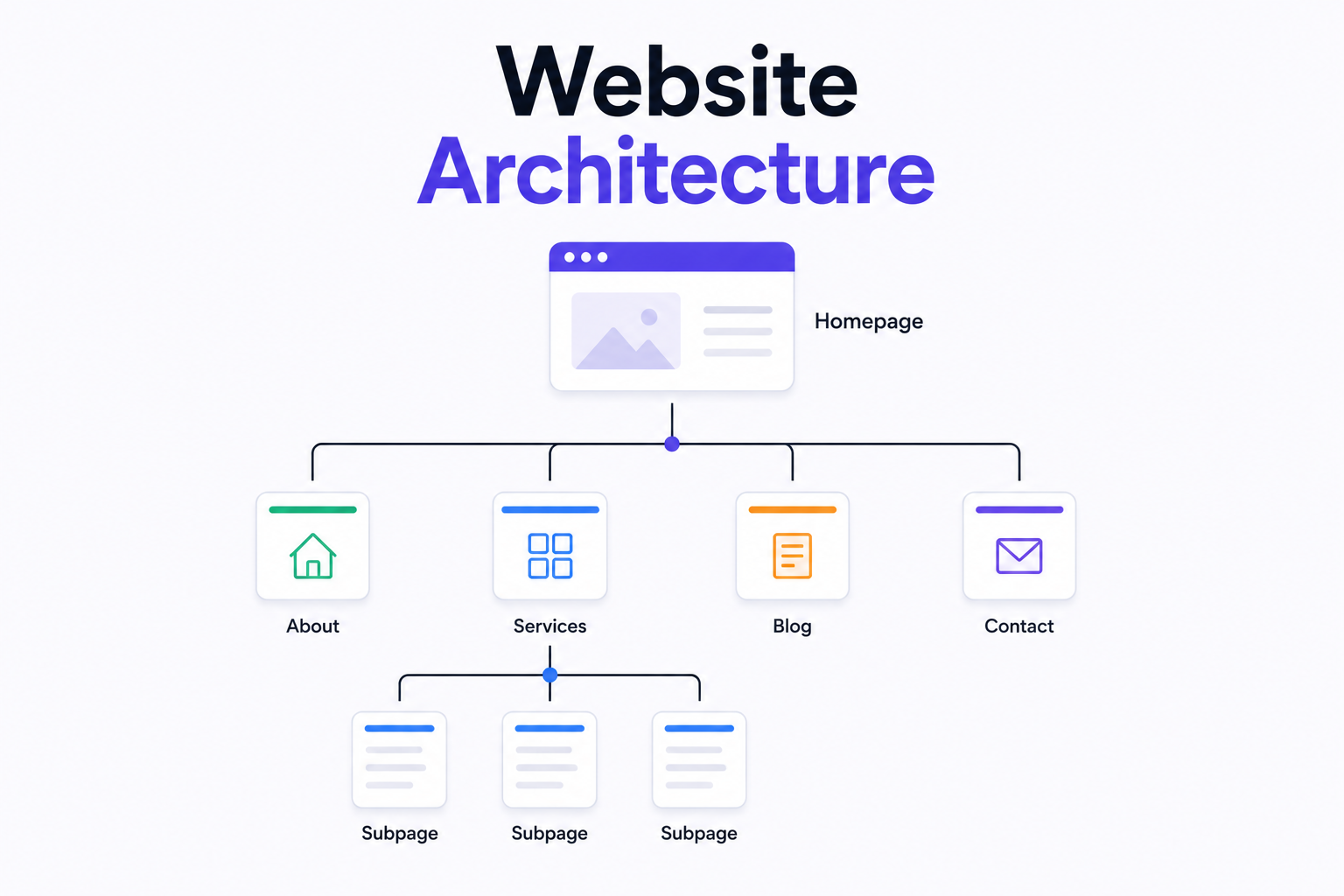
What is Website Architecture? Best Practices