What Is a Technical SEO Audit?
A technical SEO audit is a systematic examination of the technical foundations of a website to identify issues that prevent it from ranking as well as its content deserves. Where a content audit evaluates what a site says, a technical SEO audit evaluates how the site is built, how search engines access and interpret it, and whether the underlying infrastructure supports or undermines the organic search performance the business is trying to achieve.
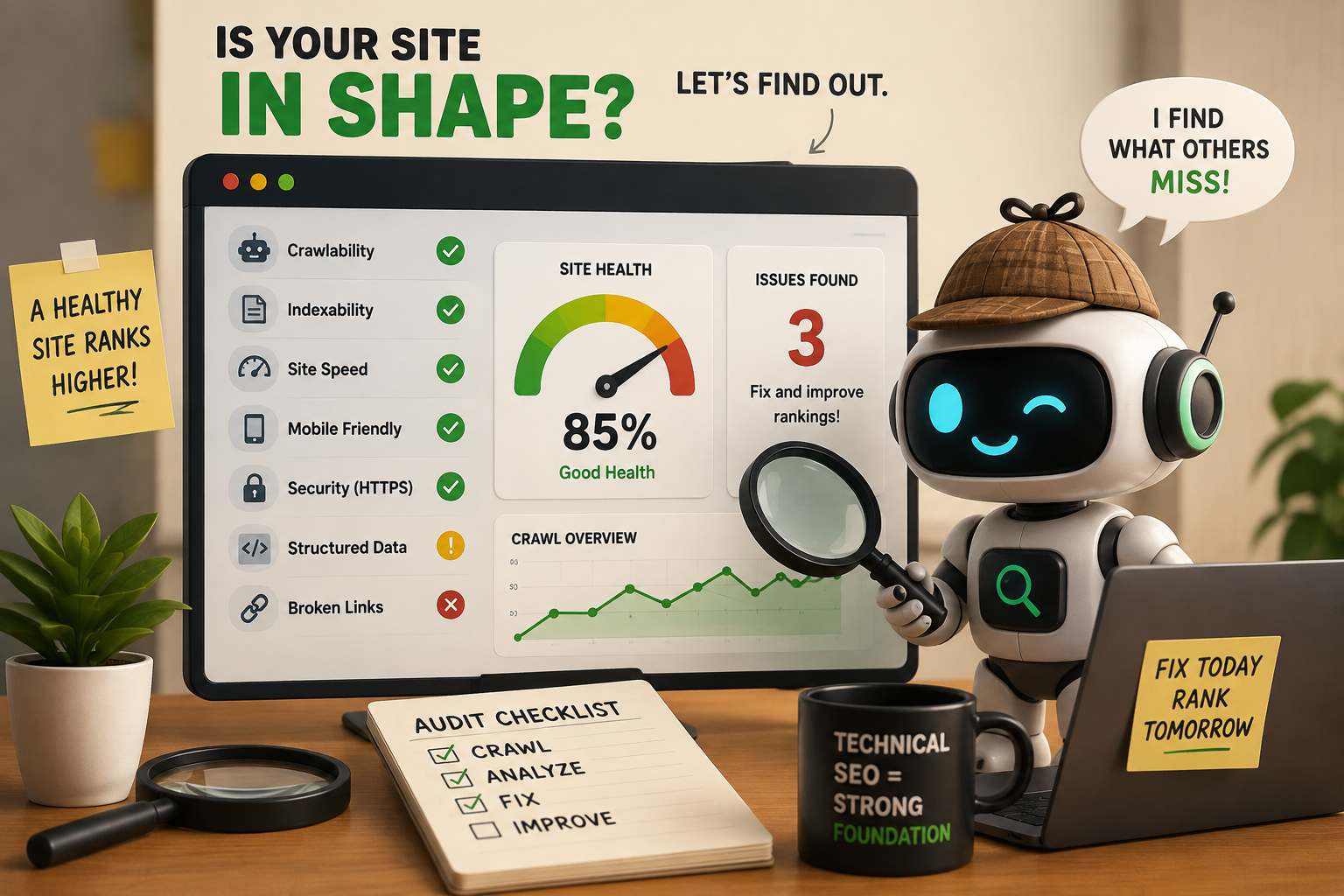
Search engines like Google rely on automated crawlers to discover, read, and index web pages. If a crawler cannot access a page, cannot understand its content, or encounters signals that suggest the page is low quality or duplicated elsewhere, that page will either not rank or will rank significantly below its potential. A technical SEO audit finds every place where this is happening and produces a prioritised plan for fixing it.
The scope of a technical audit covers crawlability, indexability, site speed, Core Web Vitals, mobile optimisation, structured data, internal linking, duplicate content, HTTPS security, and XML sitemaps. Each of these areas can contain issues that are invisible to the casual observer but clearly visible to a search engine crawler and directly responsible for lost rankings and lost organic traffic.
Why Every Website Needs a Regular Technical SEO Audit
Technical SEO issues accumulate silently. A website that launches with a clean technical foundation develops problems over time as new pages are added, redirects multiply, plugins update, and developer changes introduce unintended consequences. A business that never audits its technical SEO is almost certainly leaving organic traffic on the table, often without knowing it.
Common real-world examples of issues that audits uncover include entire sections of a site accidentally blocked from crawling by a misconfigured robots.txt file, thousands of product pages being flagged as duplicate content because of URL parameter variations that generate near-identical pages, page speed deteriorating to the point where Core Web Vitals fail and rankings drop, and structured data markup breaking after a theme update and removing rich results that were previously appearing in search. None of these issues announce themselves. They quietly cost rankings month after month until someone looks for them.
Advantages and Drawbacks of Running a Technical SEO Audit
Advantages Drawbacks Uncovers hidden issues that are actively dragging rankings down without any visible symptom Professional audits carry a meaningful cost, especially for large or complex sites Improves crawl efficiency so search engines spend their crawl budget on pages that matter The audit itself does not improve rankings — only implementing the fixes does Produces a clear, prioritised roadmap of technical fixes with measurable expected impact Implementing fixes requires developer time and budget beyond the audit cost Protects investment in content by ensuring it can actually be found and indexed Results take weeks to months to appear after fixes are deployed Identifies Core Web Vitals failures before they cause measurable ranking drops DIY audits without expertise often miss the most impactful issues Provides a performance baseline that makes the impact of future changes measurable Audits go stale quickly on actively developed sites and need to be repeated regularly
What Is Included in a Technical SEO Audit?
A comprehensive technical SEO audit covers every layer of a website's infrastructure that affects how search engines crawl, index, and rank it. The checklist below covers the areas that a thorough audit addresses, what to check in each area, how to check it, and the priority level of issues found.
Area What to Check How to Check It Priority Crawlability robots.txt rules, crawl blocks, noindex tags on important pages Screaming Frog, Google Search Console Coverage report Critical Indexability Pages excluded from index, canonicalisation, noindex directives GSC Index Coverage, Ahrefs Site Audit Critical Site Speed TTFB, LCP, render-blocking resources, image compression Google PageSpeed Insights, GTmetrix, WebPageTest Critical Core Web Vitals LCP, INP, CLS scores against Google thresholds GSC Core Web Vitals report, CrUX data, PageSpeed Insights Critical Mobile Optimisation Mobile usability errors, viewport configuration, tap target sizing GSC Mobile Usability report, Google Mobile-Friendly Test Critical HTTPS and Security SSL certificate validity, mixed content, HTTP to HTTPS redirects Browser dev tools, Screaming Frog, SSL Labs Critical XML Sitemaps Sitemap present, submitted to GSC, no 404s or noindex URLs listed Google Search Console, Screaming Frog sitemap audit High Duplicate Content Canonical tags, parameter-generated duplicates, www vs non-www, trailing slash issues Screaming Frog, Ahrefs, Semrush Site Audit High Internal Linking Orphan pages, broken internal links, crawl depth, anchor text distribution Screaming Frog, Ahrefs Site Audit High Structured Data Schema markup presence, validation errors, rich result eligibility Google Rich Results Test, GSC Enhancements report High Redirect Chains 301 vs 302 usage, chains of 3 or more redirects, redirect loops Screaming Frog, Redirect Path browser extension High URL Structure URL length, dynamic parameters, keyword relevance, consistent structure Screaming Frog crawl, manual audit Medium Hreflang (if multilingual) Correct language and region codes, reciprocal tags, x-default present Ahrefs, Screaming Frog hreflang report Medium Pagination Correct handling of paginated series, no orphaned paginated pages Screaming Frog, GSC Coverage Medium
How to Do a Technical SEO Audit Step by Step
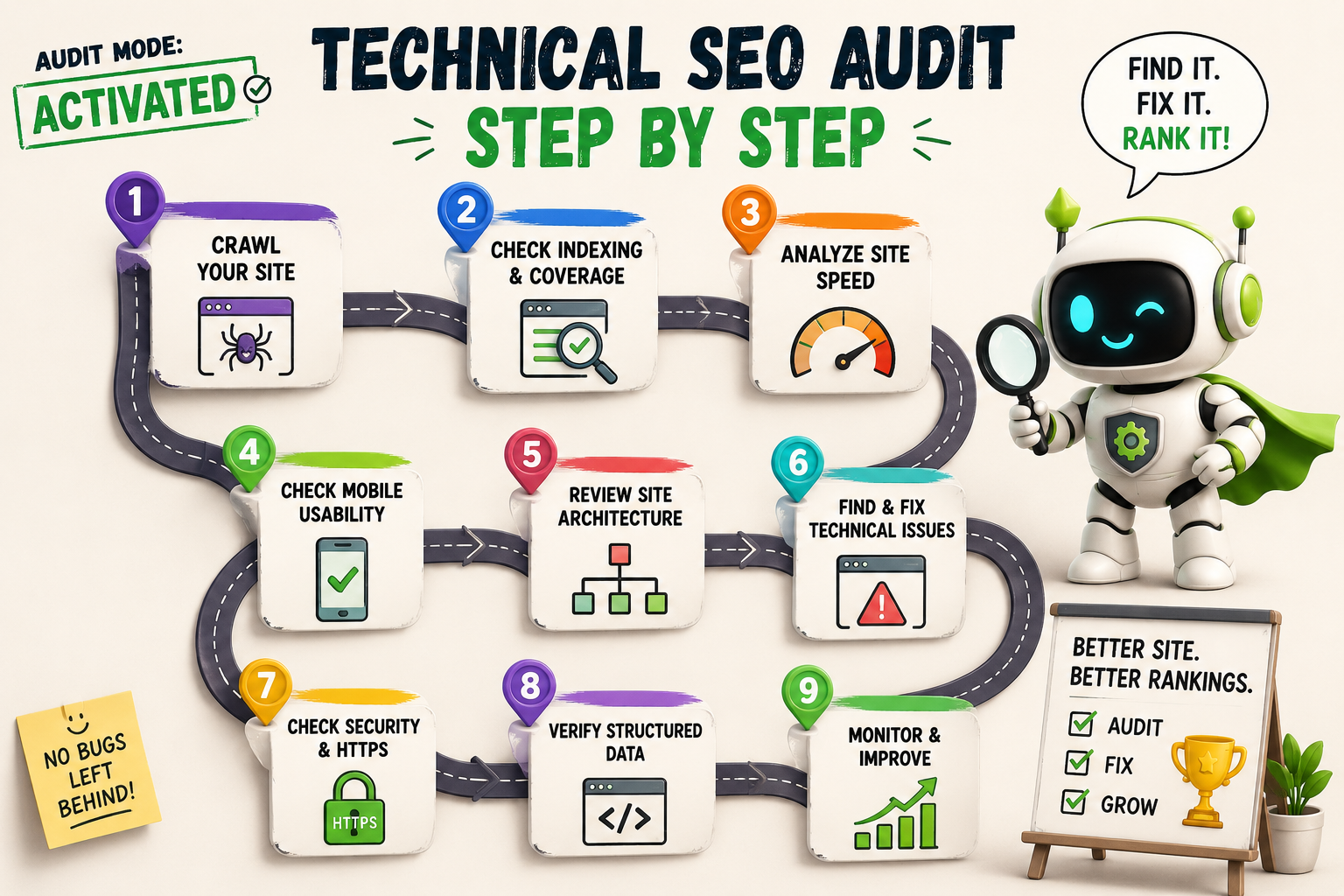
Running a technical SEO audit yourself is entirely possible with the right tools and a systematic approach. The process follows a consistent sequence regardless of the size of the site or the tools used.
Step 1: Crawl the site — Run a full crawl of the site using Screaming Frog or a similar tool. This produces a comprehensive map of every URL, its status code, its metadata, its internal links, and any technical issues detected. For sites over five hundred pages, the paid version of Screaming Frog is required. Export the crawl data as the foundation for every subsequent check.
Step 2: Check Google Search Console — Review the Coverage report for indexing errors, the Core Web Vitals report for page experience failures, the Mobile Usability report for mobile issues, the Sitemaps section to confirm the sitemap is submitted and processing correctly, and the Enhancements section for structured data errors. Google Search Console provides data from Google's actual crawl of the site, which is more authoritative than any third-party tool's simulation.
Step 3: Audit crawlability and indexability — Check the robots.txt file for any rules that block important pages or sections. Cross-reference the Screaming Frog crawl for pages carrying noindex tags that should be indexable. Identify any pages that should be indexed but are either blocked or excluded and document each one with the cause.
Step 4: Assess site speed and Core Web Vitals — Run the five most commercially important pages through Google PageSpeed Insights to get their Core Web Vitals scores and specific improvement recommendations. Check the GSC Core Web Vitals report for patterns of failure across URL groups. Identify the top three to five specific technical causes of poor scores, which typically include unoptimised images, render-blocking JavaScript, slow server response times, and layout shift caused by elements loading without reserved dimensions.
Step 5: Identify duplicate content — Use the Screaming Frog crawl to find pages with identical or very similar title tags and meta descriptions, which are often the surface symptom of a deeper duplicate content issue. Check for parameter-generated URL variations that produce identical content on different URLs and verify that canonical tags are correctly implemented where applicable.
Step 6: Audit internal linking — Identify orphan pages with no internal links pointing to them. These pages are effectively invisible to search engines regardless of how good their content is. Check crawl depth to confirm important pages are reachable within three clicks from the homepage and review anchor text across internal links for keyword relevance.
Step 7: Validate structured data — Run the Google Rich Results Test on key page types to confirm that structured data is present, valid, and eligible for rich results. Cross-reference with the GSC Enhancements report to identify any schema errors that Google has flagged across the site.
Step 8: Check HTTPS and redirects — Confirm that the SSL certificate is valid and not due to expire within sixty days. Check for mixed content warnings where a page loads over HTTPS but references HTTP resources. Audit redirects for chains of three or more hops and any 302 redirects that should be permanent 301s.
Step 9: Prioritise and report findings — Organise all identified issues into three priority tiers: critical issues that directly prevent pages from being crawled or indexed, high priority issues that are suppressing rankings, and medium priority issues that represent opportunities for improvement. Assign estimated effort and expected impact to each issue so the development team can plan implementation in the right order.
Technical SEO Audit Tools Comparison
No single tool covers every aspect of a technical SEO audit. The most thorough audits combine two or three tools that each contribute different data. The comparison below covers the most commonly used tools across free and paid tiers.
Tool What It Checks Free or Paid Best For Google Search Console Index coverage, Core Web Vitals, mobile usability, structured data, sitemaps Free Every site — non-negotiable starting point Screaming Frog SEO Spider Full site crawl, broken links, redirects, duplicate content, metadata, canonical tags Free up to 500 URLs, paid beyond Comprehensive crawl-based auditing Ahrefs Site Audit 100+ technical checks, crawlability, links, performance, structured data Paid Agencies and teams doing regular audits Semrush Site Audit 140+ technical checks with severity scoring and fix recommendations Limited free, full features paid Marketers who want actionable issue reports Google PageSpeed Insights Core Web Vitals, page speed, specific performance improvement recommendations Free Speed and Core Web Vitals analysis GTmetrix Page speed, waterfall analysis, performance scores, historical tracking Free tier available, paid for advanced features Deep speed diagnostics and waterfall analysis Google Rich Results Test Structured data validation, rich result eligibility Free Schema markup validation per page Sitebulb Visual crawl diagrams, architecture analysis, detailed technical reporting Paid Agencies presenting audit findings to clients Cloudflare / Lighthouse Core Web Vitals, accessibility, best practices, PWA checks Free (built into Chrome DevTools) Developers running per-page technical checks
Advanced Technical SEO Audit Techniques for Large and Complex Sites
The audit process covered above addresses what every website needs, regardless of size. Once a site passes roughly ten thousand pages, runs on a JavaScript framework that renders content client-side, operates across multiple languages or regions, or is preparing for a migration, a standard audit stops being sufficient. These situations call for techniques that go beyond what Screaming Frog and Google Search Console surface on their own.
Log file analysis is the single most valuable advanced technique and the most commonly skipped. Every other tool in a standard audit simulates how a crawler might behave. Log files show exactly how Googlebot actually behaved — every URL it requested, how often, and what status code it received. This reveals crawl budget waste that no simulated crawl can show: bot traffic hitting thousands of low-value filtered URLs while important pages go uncrawled for weeks. Tools like Screaming Frog Log File Analyser or JetOctopus parse raw server logs into a report showing crawl frequency by URL pattern, which is the only reliable way to confirm whether crawl budget is actually the bottleneck on a large site, rather than assuming it is.
JavaScript rendering audits matter for any site built on React, Vue, or a similar framework where content is generated client-side rather than delivered in the initial HTML response. A standard crawl often can't tell the difference between content Google can see and content that exists only after JavaScript executes. The check here is comparing the raw HTML response against the rendered DOM using Google Search Console's URL Inspection tool, which shows exactly what Googlebot sees after rendering. Discrepancies between the two — content, links, or metadata present in the rendered version but missing from the raw response — indicate a real indexing risk that a standard crawl-based audit will miss entirely.
Crawl budget optimisation becomes a distinct discipline once a site is large enough that Google cannot realistically crawl every page every day. This combines the log file data above with a review of which page types are being over-crawled relative to their value — commonly filtered or faceted URLs, internal search result pages, and paginated archives — and implementing crawl directives (robots.txt disallow rules, noindex, or parameter handling in Google Search Console) to redirect that budget toward pages that actually need to rank.
International and hreflang audits at scale go further than the basic hreflang presence check covered earlier in this guide's checklist. At scale, the common failures are reciprocal tag mismatches (page A references page B, but page B doesn't reference page A back), missing or incorrect x-default tags, and hreflang values pointing to redirected or noindexed URLs. Tools like Ahrefs' hreflang report or a custom Screaming Frog crawl configuration are needed to catch these at the volume a manual check can't cover once a site has more than a handful of language variants.
Migration audits are their own advanced category, run before and after a domain change, platform change, or major URL restructure. The pre-migration audit documents the complete current state — every indexed URL, its rankings, and its organic traffic — so the post-migration audit has a baseline to compare against. The post-migration check confirms every old URL 301-redirects to its correct new equivalent, no redirect chains were introduced in the process, and organic traffic and rankings are tracked weekly for the first two to three months, since migration-related ranking volatility can take that long to fully settle.
Technical SEO Audit for Ecommerce Websites
Ecommerce sites face a specific set of technical SEO challenges that do not affect most content or service websites. The scale of an ecommerce catalogue, the dynamic nature of product pages, and the faceted navigation structures that most ecommerce platforms use all create technical SEO problems at a volume that smaller sites never encounter.
The most common and most damaging technical SEO issue on ecommerce sites is uncontrolled URL generation from faceted navigation. When a user filters a product category by colour, size, price, and brand simultaneously, the site may generate a unique URL for every combination of filters selected. A catalogue with five hundred products and ten filterable attributes can generate millions of unique URLs, each containing near-identical content. Without correct canonicalisation and crawl control, Google spends its entire crawl budget on these near-duplicate filter pages and never reaches the actual product pages the site needs to rank.
Other ecommerce-specific technical issues that a specialist audit must address include product pages with identical or near-identical descriptions across variants such as size and colour, pagination handling on category pages with hundreds of products, out-of-stock product pages that return a 200 status code but offer no content value, structured data for products including price, availability, and review schema, and site speed on product pages that typically carry the heaviest image and JavaScript load of any page type on the site.
Technical SEO Audit vs Content SEO Audit: Key Differences
A technical SEO audit and a content SEO audit examine different layers of the same website. Understanding which type of audit is needed, and when both are needed simultaneously, prevents investing in the wrong type of analysis for the specific problem a site is experiencing.
Factor Technical SEO Audit Content SEO Audit Primary focus How the site is built and accessed by crawlers What the site says and how well it serves search intent Issues found Crawl blocks, broken links, speed failures, duplicate URLs Thin content, keyword gaps, missing pages, poor intent match Tools used Screaming Frog, GSC, PageSpeed Insights, Ahrefs Ahrefs, Semrush, Clearscope, manual review Who performs it Technical SEO specialist or developer with SEO knowledge SEO strategist or content specialist When to prioritise Good content not ranking, traffic drops, site migration, new build Rankings plateau despite technical health, keyword gaps identified Output Prioritised list of technical fixes for developers Content gaps, rewrite briefs, new page recommendations
Most sites that have been live for more than a year benefit from both types of audit run simultaneously, because technical issues and content issues often coexist and each limits the impact of fixing the other in isolation. Fixing technical crawl issues on a site with thin content does not produce ranking improvements. Publishing strong new content on a site with crawl blocks and duplicate content issues produces slower improvements than a technically clean site would achieve.
How Much Does a Technical SEO Audit Cost?
Technical SEO audit pricing varies enormously based on the size of the site, the depth of analysis required, and who is conducting the audit. The table below covers the full spectrum from self-directed DIY audits through to full-service agency audits, with realistic cost ranges for each.
Audit Type What Is Included Typical Cost Range Best For DIY with free tools GSC review, PageSpeed checks, basic Screaming Frog crawl up to 500 URLs $0 to $20/month tool cost Small sites under 100 pages with internal technical resource Technical SEO freelancer Full crawl, GSC analysis, speed audit, prioritised recommendations report $300 to $1,500 SMEs, blogs, and local businesses needing a one-time audit Boutique SEO agency Comprehensive audit across all technical areas, detailed report, walkthrough call $1,500 to $5,000 Mid-sized businesses and ecommerce sites with complex architecture Full-service agency Enterprise-level audit, log file analysis, crawl budget analysis, competitor benchmarking, implementation roadmap $5,000 to $25,000+ Large ecommerce, enterprise sites, post-migration audits
The average cost for technical SEO services when purchased as an ongoing retainer rather than a one-time audit typically ranges from $500 to $3,000 per month for SMEs, reflecting continuous monitoring, regular re-auditing, and implementation support alongside the initial audit deliverable. For businesses that have never run an audit, the one-time audit is almost always the right starting point before committing to an ongoing retainer.
DIY vs Freelancer vs Agency: Which Is Right for You?
Factor DIY Freelancer Agency Cost Near zero $300 to $1,500 $1,500 to $25,000+ Time required High — learning curve plus execution Low — managed externally Very low — fully managed Depth of analysis Limited by expertise and tool access Good for most SME sites Comprehensive for complex sites Implementation support None Sometimes available at extra cost Typically included or available Accountability Self-directed only Individual contractor accountability Team-level accountability and processes Recommended for Small sites with technical founders who want a first look SMEs needing a one-time audit with limited budget Ecommerce, enterprise, and businesses investing seriously in organic growth
How to Choose the Right Technical SEO Agency
Choosing a technical SEO agency or freelancer is a decision that directly affects the quality of the audit output and, more importantly, whether the findings are acted on effectively. The market for technical SEO services includes genuinely expert practitioners and operators who produce impressive-looking reports without the depth to match. Knowing how to evaluate the difference is the most valuable skill in the selection process.
Ask to see a redacted sample audit — Any reputable technical SEO agency should be able to show a previous audit with client-identifying information removed. A strong sample report goes beyond a tool-generated list of issues and includes specific explanations of why each issue matters, its estimated impact on rankings, and a clear recommended fix with enough detail for a developer to implement it.
Check their own technical SEO performance — An agency that cannot rank its own website for relevant search terms is not demonstrating the capability it is selling. Check the agency's site in Ahrefs or Semrush to see its organic traffic trend, its ranking positions, and its own technical health before engaging.
Clarify what is included and what is not — Some agencies include implementation support in the audit price. Others deliver the report and consider the engagement complete. Understanding whether developer hours for fixes are included, whether a follow-up audit is provided after fixes are implemented, and who is responsible for prioritising the fix schedule prevents misaligned expectations after the report is delivered.
Look for ecommerce-specific experience if relevant — Ecommerce technical SEO requires specific expertise in faceted navigation handling, crawl budget optimisation, and product schema that is distinct from standard business website technical SEO. An agency that primarily audits service business websites may miss the ecommerce-specific issues that have the most impact on a catalogue site.
Evaluate communication as much as technical knowledge — A technically excellent audit that is communicated in a way that the development and marketing team cannot understand or prioritise will not be implemented. The best technical SEO agencies translate their findings into clear business impact language and present recommendations in a format that non-technical stakeholders can approve and developers can act on without constant clarification.
How to Work With a Technical SEO Agency Effectively
The value of a technical SEO audit is entirely determined by how thoroughly the findings are implemented. An audit that produces a 40-page report but results in three fixes being deployed six months later has not achieved its purpose. Working effectively with a technical SEO agency requires organisational commitment to implementation alongside the commercial decision to commission the audit.
Before the audit begins, establish who in the business owns the technical SEO fix backlog, how developer time will be allocated to implementing recommendations, and what the decision-making process is for prioritising which fixes to address first. Agencies that conduct the audit and the implementation together, such as Munix Studio's SEO and development teams working in combination, eliminate the handoff friction that slows implementation when the auditing team and the development team are separate organisations.
Request a post-audit walkthrough call where the agency explains the findings directly to both the marketing and development teams rather than simply emailing the report. This call is the most efficient way to align both teams on the priority order and the technical approach for each fix, which reduces implementation time significantly compared to each team reading the report independently.
How Often to Run a Technical SEO Audit
For most websites, a comprehensive technical SEO audit every six to twelve months is the right cadence. Sites that are actively developed, adding new features or pages regularly, or running on a CMS where plugins or themes are frequently updated benefit from a more frequent quarterly review. Specific trigger events that warrant an immediate audit regardless of the regular schedule include a site migration to a new domain or platform, a significant unexplained drop in organic traffic, a major CMS or platform version update, and the launch of any new section or content type at significant scale.
How We Work
At Munix Studio, technical SEO audits are conducted by specialists who work directly alongside our development team. This means the findings from every audit are communicated in developer-ready language, prioritised by both SEO impact and implementation effort, and can be acted on immediately without the delay of briefing a separate agency or freelancer. We do not produce reports that sit in inboxes. We produce findings that get fixed.
Every audit covers the full technical stack including crawlability, Core Web Vitals, mobile performance, duplicate content, structured data, internal linking, and security. Ecommerce sites receive specialist coverage of faceted navigation, crawl budget management, and product schema that a standard audit does not address. The output is a prioritised roadmap with clear expected impact at each tier, not a tool-generated list of warnings without context.
Technical SEO Services From Munix Studio
A technical SEO audit is the starting point, not the finish line. Munix Studio provides the full chain from audit to implementation, with SEO specialists and developers working together to ensure every finding is fixed efficiently and the results compound over time.
SEO Optimization — Comprehensive technical SEO audits, ongoing monitoring, and full implementation support that moves from findings to fixed rankings rather than stopping at the report.
Website Development — Technical SEO built into every build from day one, with clean architecture, server-side rendering, structured data, and Core Web Vitals optimised before the site goes live.
Maintenance and Support — Regular technical SEO health checks, performance monitoring, and proactive fixes to prevent issues from accumulating between full audits.
Dedicated Developers — Dedicated development resource to implement technical SEO fixes at pace, with full context of the audit findings and direct communication with the SEO team throughout.
Frequently Asked Questions
Ready to Get Started?
SEO Optimization
Comprehensive technical SEO audits, ongoing monitoring, and full implementation support that takes findings through to fixed rankings rather than stopping at the report.
Explore SEO OptimizationWebsite Development
Technical SEO built into every build from day one, with clean architecture, server-side rendering, structured data, and Core Web Vitals optimised before the site goes live.
Explore Website DevelopmentRelated Articles

Ecommerce SEO: The Complete Guide to Ranking Your Online Store

The History of SEO: How Search Engine Optimisation Began
Next.js vs WordPress for SEO: What Matters

Organic SEO Marketing: Build Search Visibility That Compounds

SEO Content Strategy: How to Create Content That Ranks and Converts