"WordPress is dead. You need to go headless." This claim circulates in developer communities with enough frequency that many founders and marketing teams take it as established fact rather than an argument worth examining. Before spending $30,000 to $80,000 rebuilding a perfectly functional site on a headless architecture, it is worth asking whether the problem you are actually trying to solve requires headless at all.
The honest version of this debate is less exciting than the vendor version. Most of the content comparing headless CMS to WordPress is written by headless CMS companies. Reading Contentful's take on whether you should use Contentful is not a neutral source. This page tries to give you the version that helps you spend money correctly, which sometimes means recommending the smaller, cheaper option.
The Quick Verdict
Most small businesses do not need a headless CMS. If your content team manages a website, a blog, and occasional landing pages, and your traffic is not in the millions per month, WordPress with a well-configured hosting setup will serve you fine. The headless conversation becomes genuinely worth having when you need to deliver the same content across multiple platforms simultaneously, when you have a developer team that prefers working in React or Next.js over PHP, or when your content architecture is complex enough that a dedicated content API makes operational sense. If none of those descriptions apply to your situation, going headless is adding cost and complexity without a corresponding benefit.
The Real Story Behind Most "We Need to Go Headless" Conversations
A pattern that comes up with some regularity in developer communities is a client or internal stakeholder pushing for a headless rebuild because the current WordPress site is slow, hard to update, or feels outdated. When the actual pain points get documented, they usually turn out to be a bloated theme loaded with unused features, a stack of plugins that have not been audited in two years, and cheap shared hosting that cannot handle the traffic the site receives.
All three of those problems are solvable inside WordPress itself. A lighter theme or a custom build, an honest plugin audit that removes anything not actively used, and a move to quality managed WordPress hosting like Kinsta or WP Engine will resolve most performance complaints without a full architectural rebuild. The same site that scores 35 on PageSpeed Insights under its current setup can score 90 or above with proper optimization and hosting. That outcome costs a fraction of a headless migration.
This does not mean headless is never the right answer. It means "our WordPress site is slow" is not by itself a reason to go headless. It is a reason to optimize the WordPress site first and see how much of the problem disappears before committing to a more expensive architectural change.
Is WordPress Dead in 2026?
WordPress powers roughly 43 percent of all websites. That number has grown, not shrunk, over the past several years. The "WordPress is dying" narrative is a recurring theme in developer communities, particularly among developers who prefer working with modern JavaScript frameworks and find PHP-based development less appealing. That preference is legitimate. It is not the same thing as WordPress being dead or unsuitable for real projects.
What is genuinely true is that WordPress is losing ground in specific segments. Developer-led teams building complex web applications increasingly choose dedicated headless CMS platforms or custom backend solutions. Enterprise companies managing content across many channels have legitimate architectural reasons to move away from a coupled CMS. But the small business, professional services, and content-driven website market, which is the majority of the web, continues to run on WordPress at scale. Pronouncing it dead is a category error based on what is changing at the technical frontier rather than what is happening across the broader web.
What Headless Architecture Actually Solves
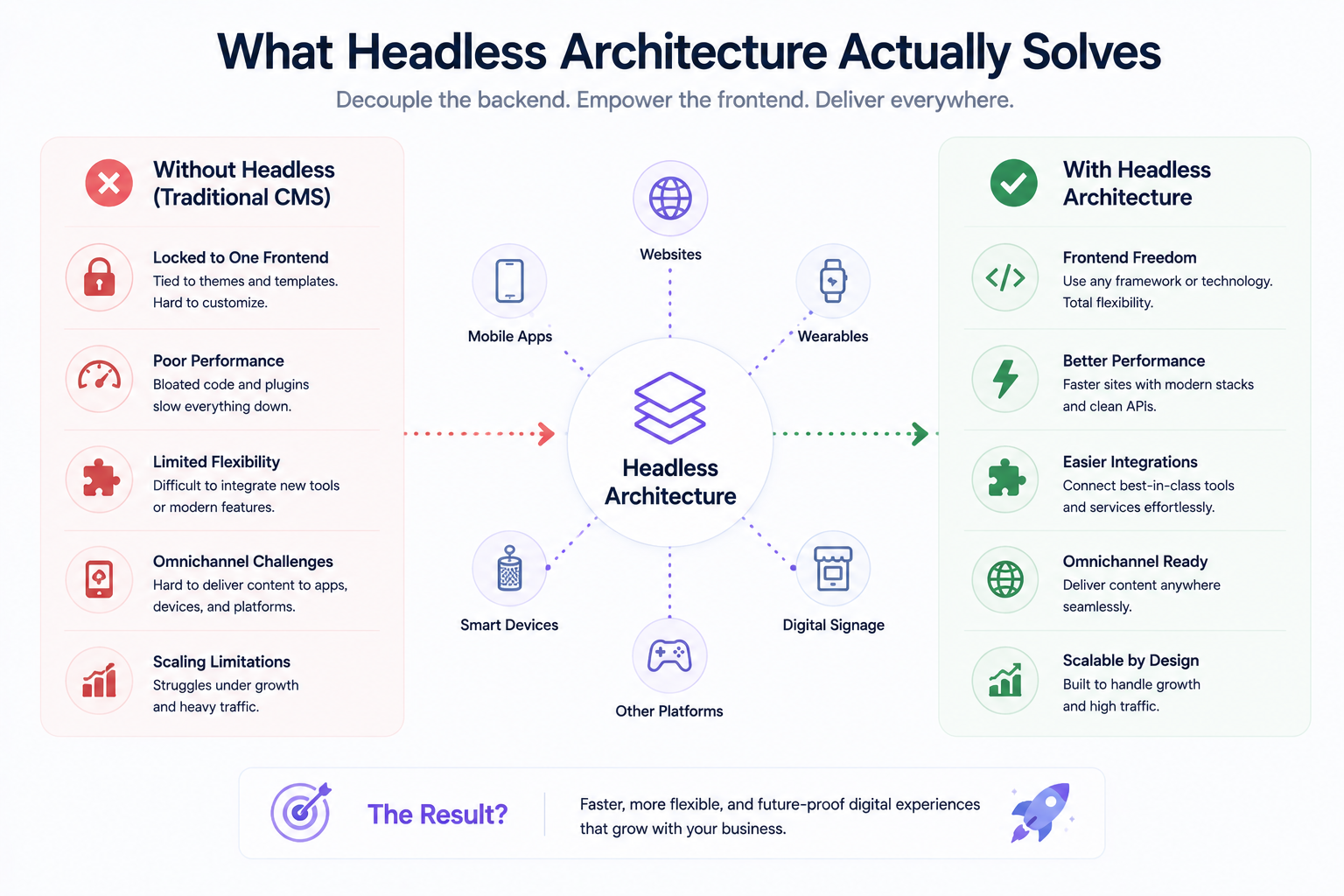
When headless is the right architectural choice, it solves a specific set of problems that traditional CMS setups handle poorly. Understanding exactly what those problems are is the clearest way to decide whether your situation warrants the investment.
Multi-Channel Content Delivery
A headless CMS delivers content via API, which means the same content can be consumed by a website, a mobile app, a digital signage system, an email marketing platform, or any other surface that can make an API request. If you manage a content operation where the same article, product description, or structured data needs to appear in multiple places simultaneously, a headless architecture makes that genuinely easier. A traditional WordPress setup can do this with plugins, but it is not what the system was designed for, and the workarounds create maintenance overhead.
Frontend Framework Freedom
With a headless CMS, your frontend can be built in whatever framework your development team prefers, whether that is Next.js, Nuxt, Astro, SvelteKit, or something else. You are not constrained by PHP themes or the block editor. For developer teams working in modern JavaScript stacks, this is a real quality-of-life improvement that also produces better performance outcomes. The frontend can be deployed as static files on a CDN, which delivers load times that PHP-rendered pages cannot match without significant caching infrastructure.
Reduced Security Attack Surface
A traditional WordPress site exposes its admin panel, login page, and PHP execution environment directly to the internet. That attack surface is well-documented and regularly targeted. A headless setup where the CMS backend is not publicly accessible, and the public-facing site is a static or server-rendered JavaScript frontend with no direct database connection, is genuinely harder to compromise. This is a real security benefit rather than a theoretical one, and for businesses handling sensitive data or running high-profile sites, it is worth factoring in.
What Headless Does Not Solve
Equally important, and far less discussed in the headless CMS vendor ecosystem, is what going headless will not fix and what it might actually make worse for your specific situation.
Non-Technical Content Teams Lose Their Independence
WordPress's most underrated feature is that a non-technical marketing manager can update pages, publish posts, add images, and manage menus without any developer involvement. The Gutenberg block editor is not perfect, but it is genuinely usable by people who do not write code. A headless setup with a dedicated CMS frontend requires content teams to learn a new interface, and the deployment of content changes often requires a build process that a developer needs to trigger or that runs on a schedule. Spontaneous content updates become less spontaneous.
Ongoing Developer Dependency Increases
A WordPress site can be maintained by someone with moderate technical skills and no ongoing developer involvement for routine tasks. A headless setup requires a developer whenever something breaks in the frontend build pipeline, whenever a CMS schema change needs to propagate to the frontend, or whenever a new content type needs to be created and rendered. The initial build cost is higher and the ongoing maintenance cost is also higher. For businesses without in-house developers, that ongoing dependency on external development support is a real operational cost that the initial build quote does not always make visible.
Plugin Ecosystem Does Not Exist in the Same Way
WordPress has over 59,000 plugins covering everything from payment processing to SEO to form builders to membership systems. In a headless setup, most of those plugins have no equivalent. You either integrate with third-party services via their own APIs, which is perfectly viable but adds integration work to every feature you add, or you build the functionality yourself. For a simple marketing site this is rarely a problem. For a site that relies on five or six WordPress plugins to function, the headless migration cost expands significantly once the replacement integrations are scoped.
Comparing the Options Directly
Factor Traditional WordPress Headless CMS Headless WordPress Setup cost Low High Medium to high Non-technical editor experience Excellent Varies by CMS Good, familiar WordPress admin Frontend performance ceiling Good with optimization Excellent, static or SSR Excellent, Next.js frontend Multi-channel delivery Limited, plugin-dependent Native, API-first Possible via WP REST API Ongoing developer dependency Low for routine tasks High Medium Security surface Larger, PHP exposed publicly Smaller, backend not public Medium, WP admin still exists Plugin ecosystem 59,000 plus plugins Third-party APIs replace plugins WordPress plugins still available Best for Small business, blogs, content sites, non-technical teams Multi-channel, JS-first dev teams, complex content models Teams wanting modern frontend with familiar CMS backend
What Is the Difference Between Headless WordPress and a Dedicated Headless CMS?
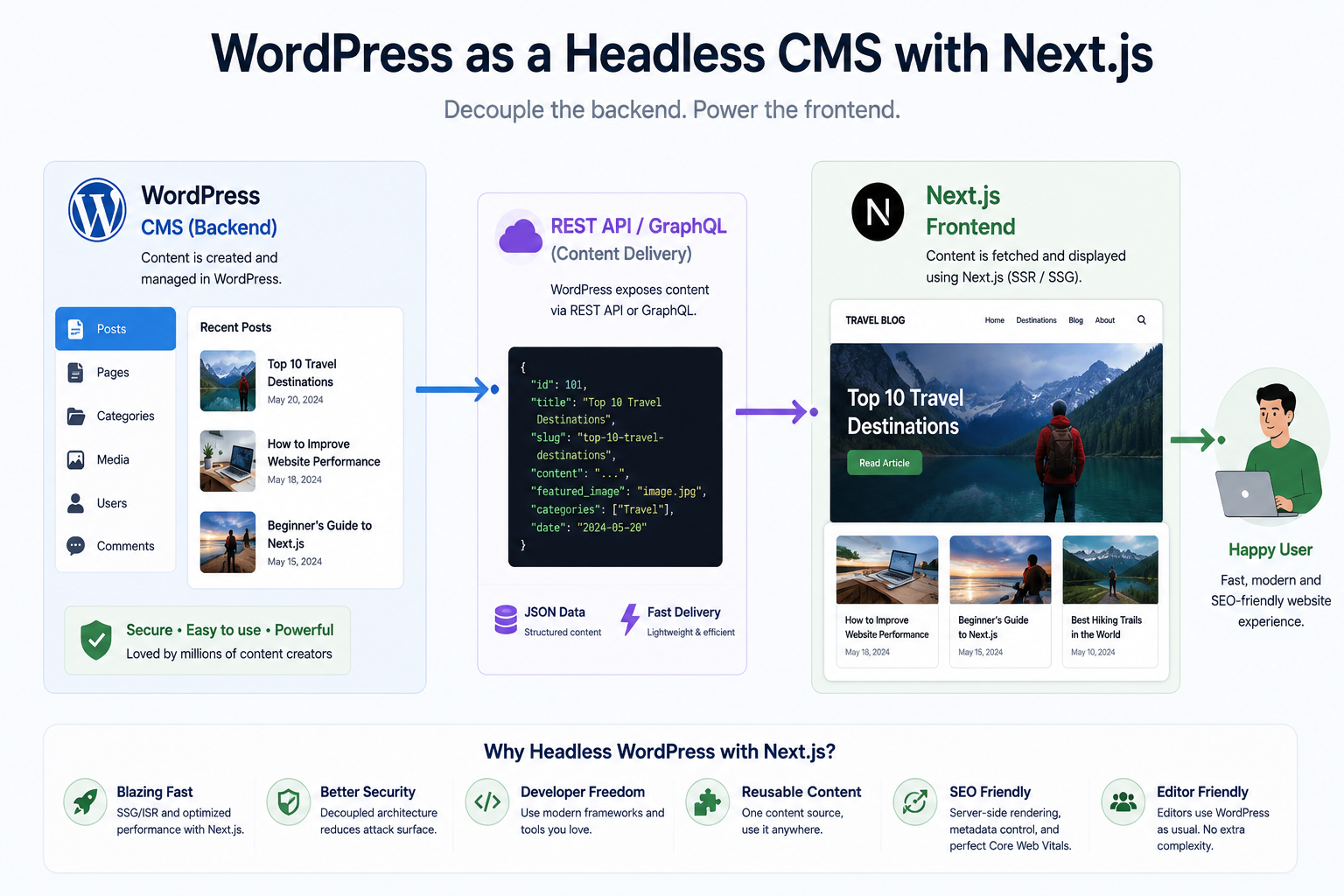
Headless WordPress means using WordPress purely as the content backend, exposing content through its built-in REST API or via the WPGraphQL plugin, while building the public-facing frontend in a separate JavaScript framework. WordPress still runs on a server, the admin panel still exists, and content editors still use the familiar WordPress interface. The frontend, whether built in Next.js, Nuxt, or Astro, is a separate application that fetches content from WordPress via API.
A dedicated headless CMS such as Contentful, Sanity, or Strapi is a purpose-built content API with no coupled frontend at all. It was designed from the ground up to be API-first, which means content modeling, querying, and multi-channel delivery are native features rather than bolt-ons. The content editor interfaces in dedicated headless CMS platforms vary in quality. Sanity's Studio is genuinely well-designed. Contentful is powerful but can feel complex for non-technical users. Strapi is self-hosted and highly customizable. None of them have the editorial experience or plugin ecosystem that WordPress has accumulated over twenty years.
For most teams making the transition from traditional WordPress to a modern frontend stack, headless WordPress is the practical middle path. Content editors keep the admin they know. Developers get to build in Next.js. Performance improves substantially because the public frontend is a separately optimized application. The WordPress backend is locked down and not publicly accessible as an attack surface. This is the setup we discuss in more detail in our companion page on Next.js vs WordPress, which covers the frontend side of this decision in more depth.
How Much Does a Headless CMS Cost Compared to WordPress?
The cost gap is significant, and it exists at both the build stage and the ongoing operational stage. WordPress itself is free. Quality managed WordPress hosting from providers like Kinsta or WP Engine runs between $30 and $150 per month depending on traffic and the plan. A professionally built custom WordPress site from a quality agency typically costs between $5,000 and $25,000 depending on scope and complexity.
Cost Item Traditional WordPress Headless Setup CMS platform cost Free $0 (Strapi, self-hosted) to $300 per month (Contentful growth plan) Hosting cost per month $30 to $150 $20 to $100 frontend plus CMS hosting separately Initial build cost $5,000 to $25,000 $20,000 to $80,000 Ongoing developer maintenance Low, manageable without specialist Higher, build pipeline and schema changes need developer Content editor training cost Minimal, most people know WordPress Moderate, new interface and workflow
The total cost of ownership for a headless setup over three years, accounting for the higher build cost, the CMS platform subscription, and the increased developer maintenance, is typically three to five times the equivalent WordPress setup. That gap is justified when the headless architecture is solving a real problem at that scale. It is not justified when the motivation is to modernize the tech stack for its own sake.
Headless CMS vs WordPress: Popular Platform Comparison
Platform Type Best For Pricing WordPress Traditional CMS Small to mid businesses, blogs, non-technical teams Free, hosting from $30 per month Contentful Dedicated headless CMS Enterprise, multi-channel, large content teams Free tier, then $300 to $2,000 per month Sanity Dedicated headless CMS Developer-led teams, complex content models, good editor UX Free tier, then $99 per month upward Strapi Open-source headless CMS Teams wanting control, self-hosted, no vendor lock-in Free self-hosted, cloud plans from $29 per month WordPress as headless Hybrid Teams wanting modern frontend without abandoning WordPress WordPress hosting plus frontend hosting separately
How We Approach This Conversation With Clients
When a client comes to Munix Studio asking about headless CMS, the first thing we do is ask what problem they are actually trying to solve. If the answer is slow performance, we look at their current hosting and theme before recommending a full rebuild. If the answer is multi-channel content delivery to a web app, a mobile app, and additional surfaces, headless is probably the right architecture and we scope it accordingly. If the answer is "we heard WordPress is dead," we have an honest conversation about what that actually means and what their real requirements are.
For teams who want a modern frontend without abandoning WordPress, we build headless WordPress setups using Next.js as the frontend layer, which is the pattern we cover in more detail in our page on Next.js vs WordPress. You can also use our free website cost calculator to get a rough budget range for either approach before committing to any conversation.
Related Services
Whether you are building on WordPress, going headless, or exploring the hybrid middle path, Munix Studio can help you choose the right architecture for your actual requirements and build it properly.
Website Development — Custom website development covering traditional WordPress builds, headless WordPress with Next.js, and fully custom headless architectures using Sanity or Strapi as the content backend.
Maintenance and Support — Ongoing support for WordPress and headless setups, covering updates, security patches, and build pipeline maintenance so your content team is never blocked by technical issues.
Dedicated Developers — Hire a dedicated developer or team to handle your headless migration or custom CMS integration without requiring a full agency engagement.
Frequently Asked Questions
Related Articles
Freelancer vs Agency: What Reddit Users Recommend
Choosing a Web Design Agency: Reddit's View
WordPress to Next.js Migration: What Happens
React vs WordPress for Small Business

How Much Should a Website Cost in 2026